Introduction
In this challenge we are working on reverse engineering a Go ransomware sample to uncover its evasion techniques, encryption implementation, lateral movement capabilities, and anti-forensics methods. Loads to do, so let's dive in!
GO Compiler Version
Q1) Which version of the Go compiler was used to build this binary?
Normally we would use tools like Detect-It-Easy or PEStudio to identify compiler versions and
other related information. However, with go binaries, we can use the go executable itself.
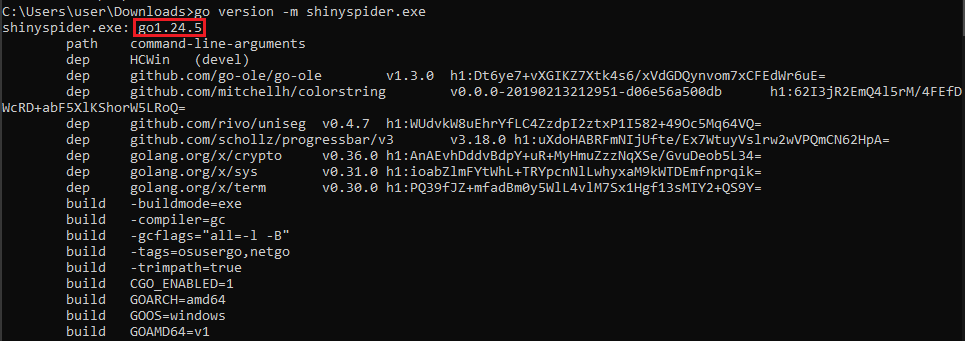
For example go version -m shinyspider.exe already is enough to
identify the Go Compiler version: go1.24.5
RVA of Main
Q2) What is the Relative Virtual Address (RVA) of the program's main function?
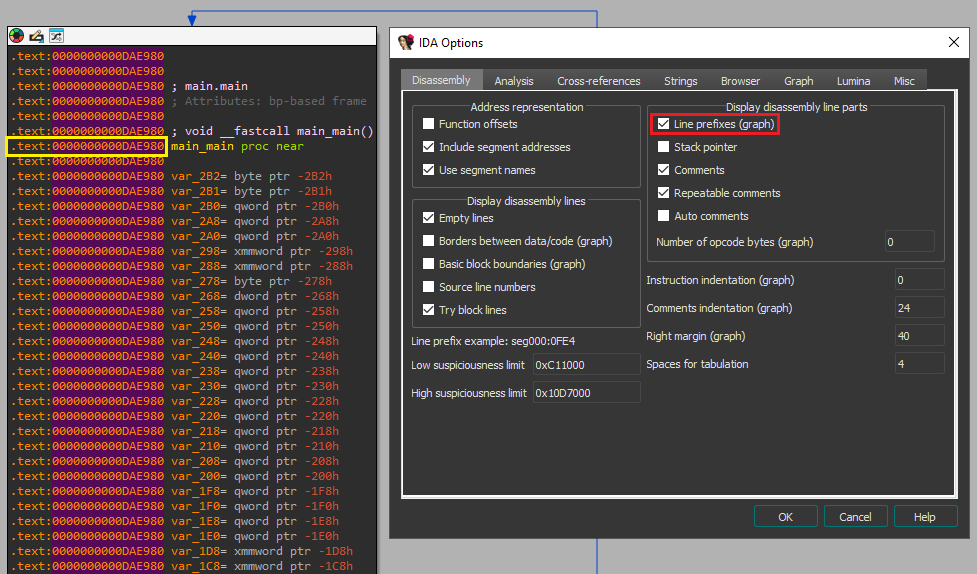
The Relative Virtual Address can be obtained by using IDA (Pro) and enabling Line Prefixes.
To do so, open IDA (Pro) and navigate to Options -> General. In the Disassembly tab, you
should see a checkbox at the top of the right-hand window saying 'Line Prefixes'. When you
enable this and then subsequently go to the main_main function,
we can easily derive the RVA, which is 0xDAE980
First resolved Windows API
Q3) In the isRunningAsAdmin function, which Windows API is the first to be resolved via the HCWin/apihash package?
Using IDA (Pro), we can use the functions search option to look for the isRunningAsAdmin
function and navigate to it in our IDA View window. As IDA has automatically resolved string names,
function names and other valuable information for us, we only have to read through the function to
identify the answer to the question.
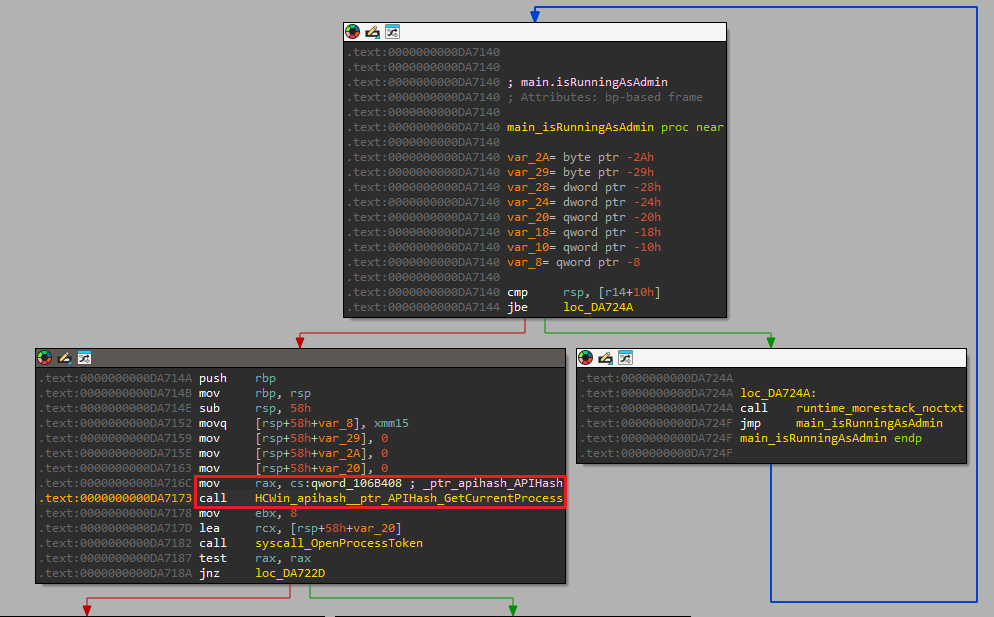
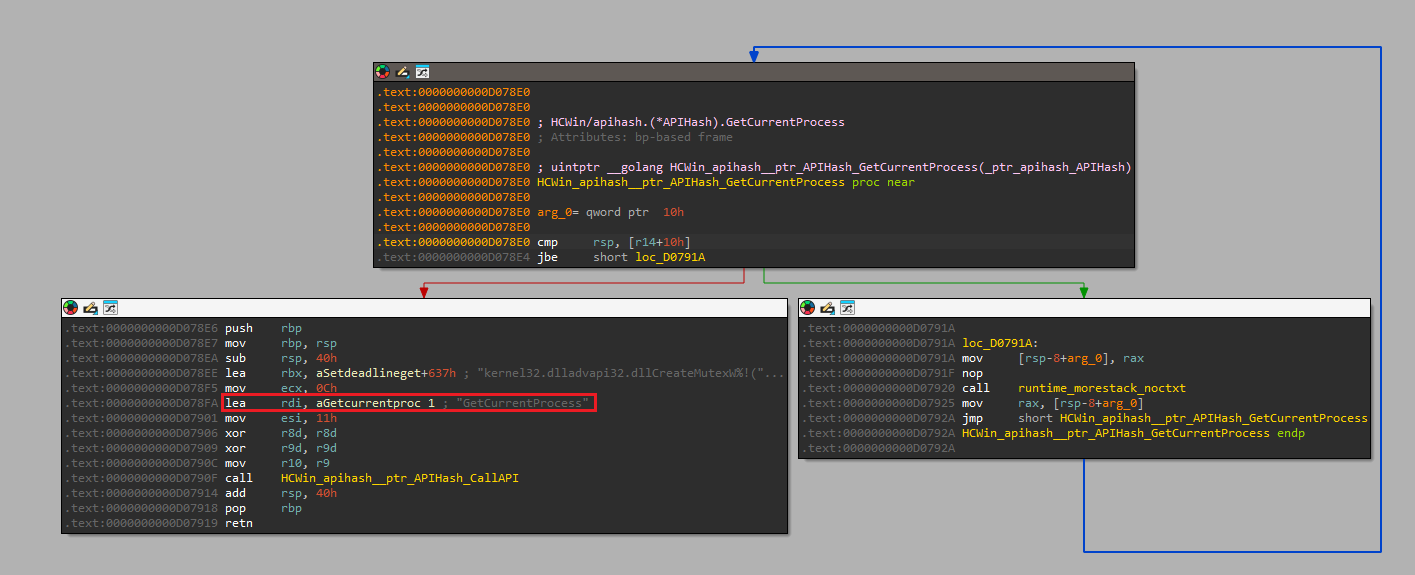
At line 0xDA716C we see a reference to _ptr_apihash_APIHash and subsequently a
call to the function called HCWin_apihash__ptr_APIHash_GetCurrentProcess.
Furthermore, when we dive into this function, we see that the string GetCurrentProcess is
obtained and used as a parameter for a call to the function
HCWin_apihash__ptr_APIHash_CallAPI.
This allows us to conclude that the Windows API that is being resolved is
GetCurrentProcess.
Token Class requested
Q4) The binary calls GetTokenInformation. What specific token class (by name) is being requested to verify privileges?
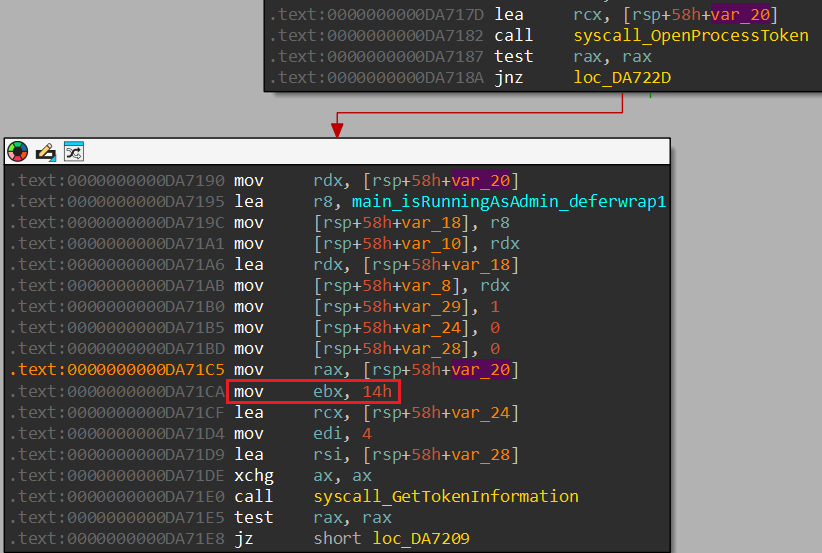
Within the isRunningAsAdmin function, a syscall to GetTokenInformation can be
identified. The function takes a total of 5 parameters, with the second parameter containing the
TOKEN_INFORMATION_CLASS. In the case of this malware sample, that value is passed through
ebx which is set to the value 0x14 and corresponds to
TokenElevation
ETW Package
Q5) Which package is responsible for configuring and executing the evasion of Event Tracing for Windows?
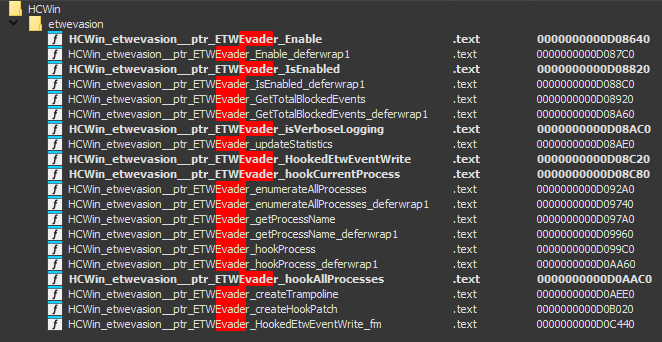
Based on the information in the question, we have a few starting points that could lead us to
identifying the function in question. The most straightforward way is to use the functions search option
and use any of the keywords (such as "evade" or "etw") to identify corresponding functions in the
binary. To our luck, one package contains functions responsible for configuring and executing the
evasion of Event Tracing for Windows: HCWin/etwevasion.
ENV variable for seed generation
Q6) If the malware fails to retrieve the computer name via the Windows API, which environment variable does it read as a fallback to generate the system seed?
Before we start our quest down a rabbit hole in search of a function calling
GetComputerName*, we have to remind ourselves that the malware uses API hashing, so we will
not be able to find it searching for strings and any function that uses GetComputerName*
might be a false flag.
As such, we have to rely on the last part of the question, to actually search for a function that
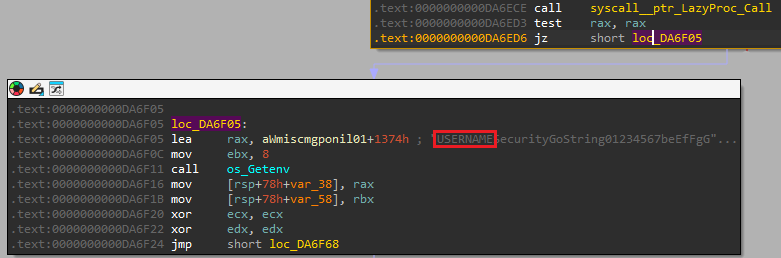
generates the system seed. Within the main package, the function getSystemSeed
seems the prime candidate.
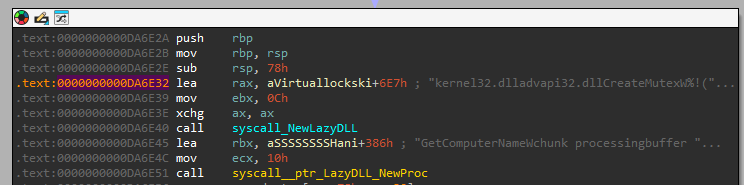
Within the function, we see the hardcoded values for the DLL and GetComputerName function and at the end
of the block, we see that if the result is zero, a call to Getenv takes place and the
specific environment variable that the value is request for corresponds to USERNAME
DLL for GetComputerNameW
Q7) The function getSystemSeed dynamically loads a DLL to access GetComputerNameW. What is the name of this DLL?
We stay within the getSystemSeed function. We previously already identify the operation
which loads the string GetComputerNameW. Shortly before this operation we identify that the
string kernel32.dll is loaded.
Mutex prefix
Q8) The malware prepends a specific string to the generated Mutex name to ensure the synchronization object is visible across all user sessions. What is this prefix?
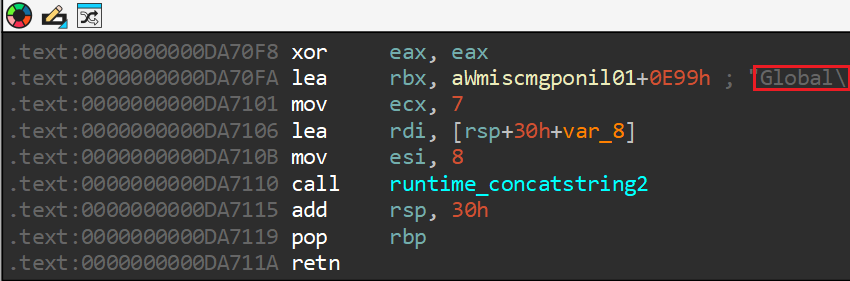
Within the main package, a function called generateMutexName can be
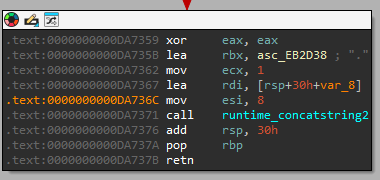
identified. At the end of the function, at and after 0xDA70FA, we see the concatenation of
the generated mutex with a hardcoded string of the value Global\. By reading the
Microsoft
Documentation, we learn that the Global\ prefix should be used to ensure the mutex is
visible across all terminal server sessions.
Windows Error check
Q9) Which specific Windows error code does the checkSingleInstance function check to see if the Mutex already exists?
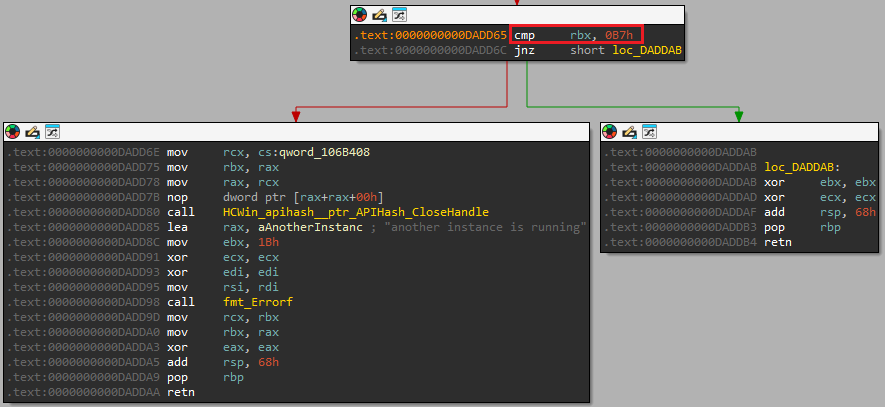
By analyzing the main_checkSingleInstance function, we should be able to identify the
specific Windows error code. At the bottom of the function, we see three specific nodes which all
contain a specific string that will be send to fmt_Errorf, which handles formatting error
messages. The message another instance is running is highly likely indicating that the
mutex already exists and therefore another instance of this malware is already running.
Just before this error block, we see that a check against the value 0xB7 takes place. By
analyzing the System
error codes, we learn that 0xB7 denotes that the mutex already exists.
Hook Shield
Q10) The Hook Shield module starts a monitoring routine to check for hooks periodically. What is the time interval (in milliseconds) defined in this check?
The HCWin/hookshield module contains multiple functions, amongst which the
performScan function. During analysis, we can't find any integer that matches a time
interval. This function is called from monitoringLoop. Within this function, we neither
can find any time interval variable. The caller of monitoringLoop is
StartMonitoring_deferwrap2 which is invoked by StartMonitoring. In neither
of these functions do we find any variable which clearly stands out as matching a time interval.
However, StartMonitoring is invoked from main_main with one argument:
0x1DCD6500 or in decimal: 500000000.
Taking the answer format into account, it appeared to me that the given value is in nanoseconds.
Therefore, the interval in milliseconds is 500.

Remove Windows VSS
Q11) To prevent victims from restoring files, the malware executes a specific function to remove Windows Volume Shadow Copies. What is the name of this function?
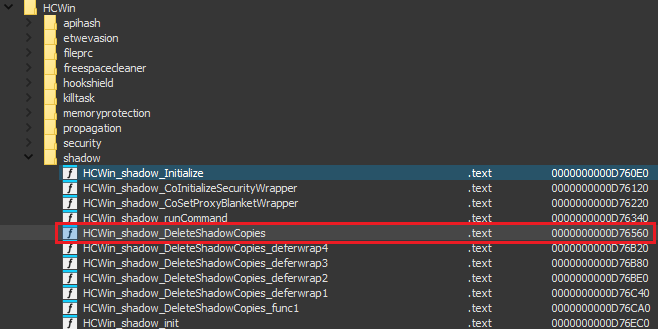
By now, we know that all malware functionality is part of the HCWin package. Therefore, we
can iterate through the modules in this package, to identify any functions that perform operations on
Volume Shadow Copies.
We see that there's a specific module named shadow, which contains amongst others the
function DeleteShadowCopies.
Distinct processes killed
Q12) How many distinct services or processes is the malware configured to terminate (kill)?
When analyzing the killBlacklistedServices function, we see at location
0xDAB7CD a pointer to a hardcoded offset is loaded into rax. Subsequently,
that is stored in [rsp+240h+var_190] which is in a loop block and gets increased for each
iteration at location 0xDAB7EC.
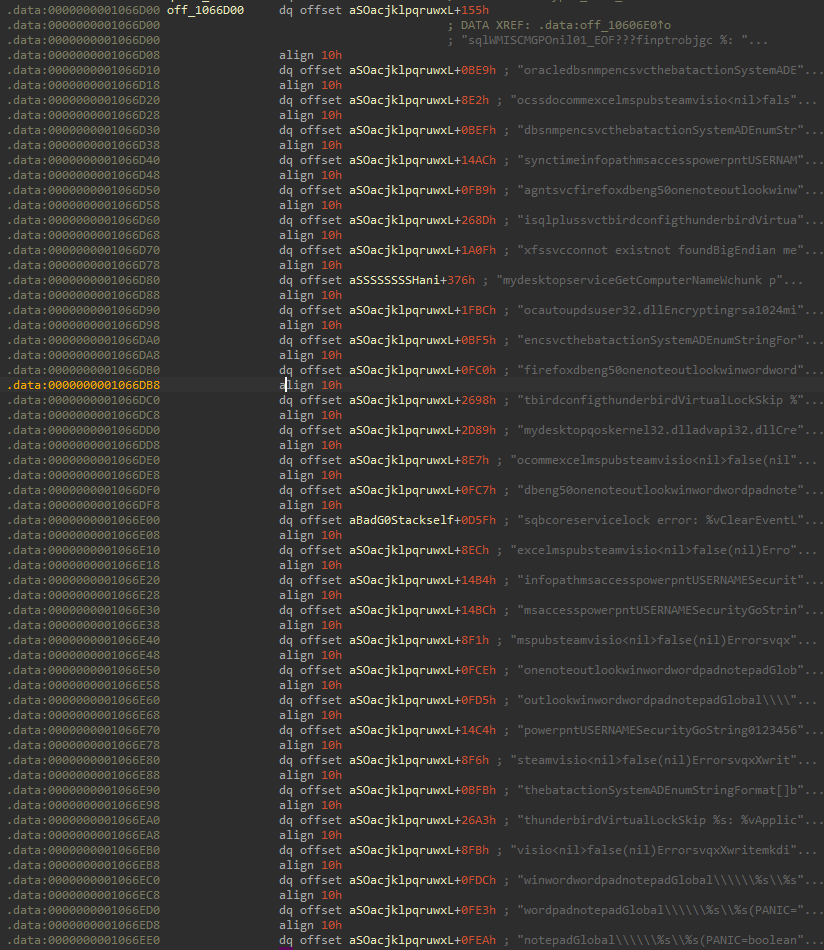
Now, by analyzing what is at off_1066D00, we identify that it contains pointers to
hardcoded strings elsewhere within the .rdata section. All of the strings contain a service
or process name, therefore, we can count all values in this list and obtain the total number of distinct
services or processes to kill.
In total, the list contains 31 distinct services or processes.
String data for first kill
Q13) What is the memory address of the string data for the first service in the kill list?
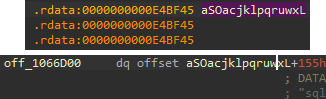
By answering question 12, we have identified the location of the list to be at 0x1066D08.
Furthermore, we know that the list contains pointers to data, so we will have to follow the
pointer of the first entry in the list to actually identify the memory address of the string.
Do note, that each pointer contains an additional offset. So for the first entry, the data
starts at 0xE4BF45, and we need to add the offset of 0x155 to it.
The final answer in this case is that the first service is located at: 0xE4C09A
Propagation methods
Q14) The malware uses multiple methods to propagate to other systems. According to the string at 0xe4c09d, what is the first protocol it attempts to use for remote execution?
We can navigate to the memory location by using the shortcut G in IDA. We end up in the
.rdata section and see a bunch of bytes.
However, we know from the question that there must be a string here, so we can use the shortcut
A to directly convert the bytes to a string. The first three letters at this location
correspond to WMI.
WMI stands for Windows Management Instrumentation and is a popular method to remotely execute commands

File share ports
Q15) To identify vulnerable file shares for lateral movement, the malware checks for a specific open port number. What is this port?
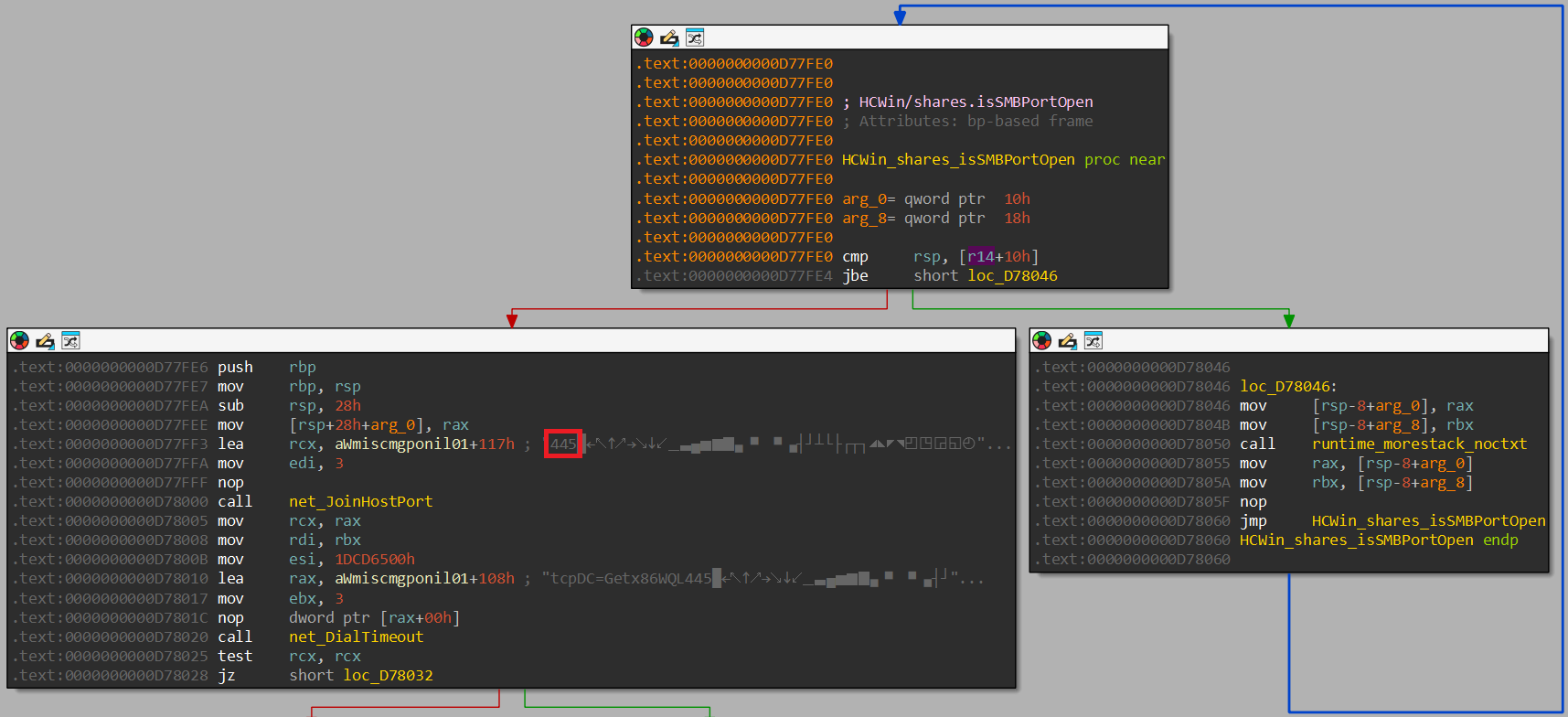
Within the HCWin/shares package, we identify the existence of a function named
isSMBPortOpen. Within this function we identify the static value of 445 which
is used to join the host and port.
Hidden directory exclusion
Q16) The malware contains a hardcoded list of files to skip to ensure the OS remains bootable. Which hidden system directory related to deleted files is explicitly excluded?
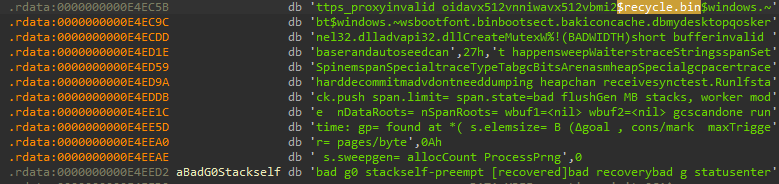
This took some manual effort of going through the .rdata section and converting all
individual bytes to strings. Furthermore, based off of "directory related to deleted files", it seemed
apparent we would be searching for the hidden directory name for the recycle bin. Ultimately, we end up
finding a string referring to $recycle.bin
Ultimately, it is likely that during analysis we missed the iterator over one of the variables within
.rdata that would have corraborated our initial hunch.
File encryption exclusion
Q17) To avoid encrypting its own instructions, the malware excludes a specific filename from the encryption list. What is the name of this note file?
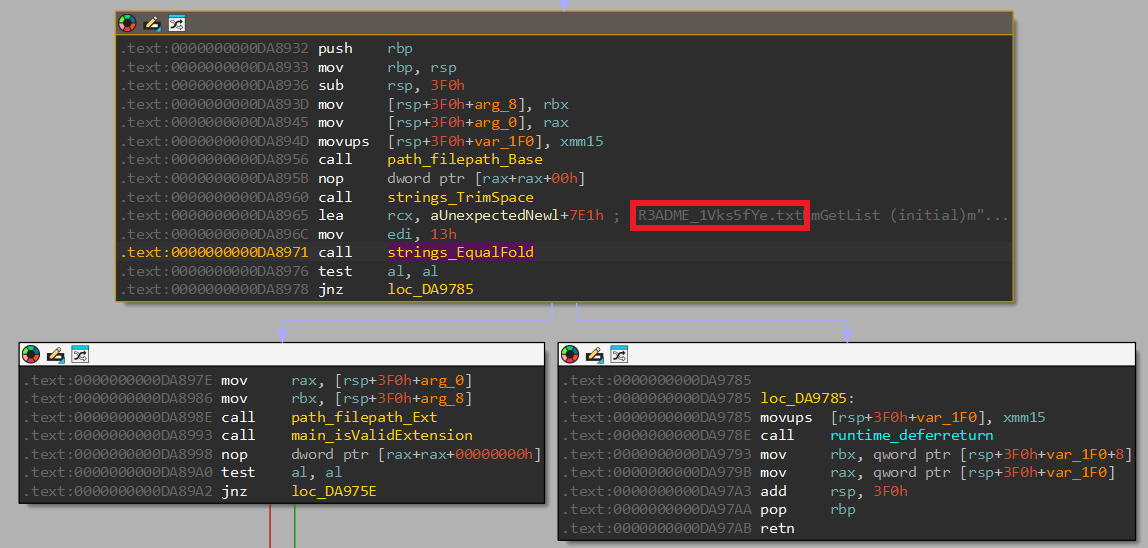
Previously, we identified two functions responsible for identifying files findFiles and
findFiles_func1. Within the latter, we identify a hardcoded string being loaded at
0xDAB3D8 with a value of R3ADME_1Vks5fYe.txt. Now, most often, ransomware
operators drop a file with a name along the lines of "README" on infected systems containing
instructions on how to contact and more importantly pay the operators to remove the ransomware. It is
likely that this file is being excluded.
To further corraborate our finding, we look at the function encryptFile, which also
incorporates a check to ensure that the README file is not encrypted, as the function will return
without encrypting the file if the current filename matches the hardcoded README file name. Therefore,
we can conclude that this file contains the instructions and is excluded.
Extension validation
Q18) The malware uses a checksum algorithm to identify files it has already encrypted. What is the expected total length (including the dot) of the extension validated in 'isValidExtension'?
To answer this question, we dive into the isValidExtension function. This function resides
in the main package, and another function containing the word Extension
exists, by the name of generateExtension. By analyzing the latter function, we identify
that including the dot, an extension of length 9 is generated.
Now we can go back to isValidExtension and identify that the first check in this function
is to see if the length is equal to 9.
Symmetric Key Length
Q19) The malware generates a random symmetric key for each file. Based on the buffer size passed to crypto/rand.Read, what is the bit length of this key?
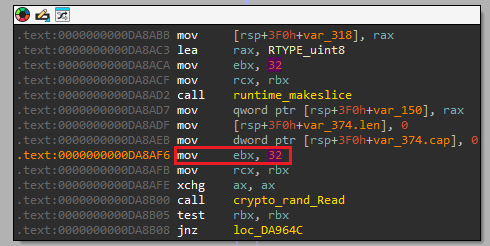
By cross-referencing all calls to crypto/rand.Read we identify that it is called from
encryptFile. The buffer size passed to the Read function is of size 32 bytes.
Therefore, by calculating the bit size, we know that the key is of size: 256 bits.
RSA Padding Scheme
Q20) To secure the per-file symmetric keys, the malware encrypts them using a public key algorithm. Which specific padding scheme is used with RSA?
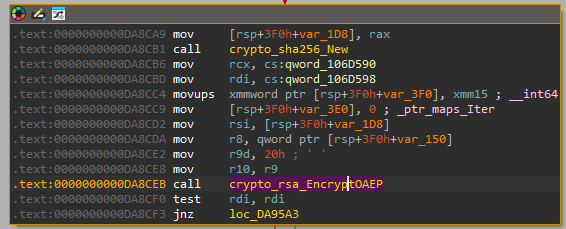
We stay within the encryptFile function from the previous question and continue analyzing
the code. At location 0xDA8C99 we see a call to a function that will load the Public Key
from the Modulus. Subsequently a new SHA256 value is created and at crypto_rsa_EncryptOAEP
is called.
Now, RSA uses OAEP, which stands for Optimal Asymmetric
Encryption Padding to enhance the security of the RSA algorithm.
Magic Marker
Q21) The malware creates a header for encrypted files. What 4-byte ASCII string (Magic Marker) is written at the very end of the file header?
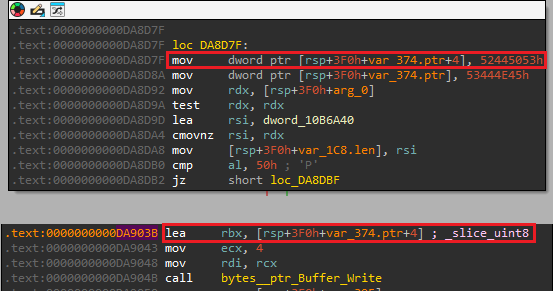
Within the encryptFile function, starting at 0xDA8D20, a string is trimmed and
subsequently lowered. Then, the length of the string is compared to 7 and subsequently the contents of
the string is compared. Afterwards, there are two main paths that lead to 0xDA8D7F and in
both a string ("partial" and "automatic") are compared. Whichever comes out, at 0xDA8D7F,
the string "SPDRENDS" is placed into the buffer [rsp+3F0h+var_374.ptr]. This buffer is then
used at 0xDA903B to load the value into rbx which is subsequently passed to
the Write function after encryption has completed.
Based on this analysis, we can conclude that the 4-byte ASCII string that is written to the end of
the file is: ENDS
Partial Encryption Char
Q22) For large files, the malware does not encrypt the entire content to save time. What single character does it write to the file footer to indicate this mode?
Within the encryptFile function, starting at 0xDA8D20, a string is trimmed and
subsequently lowered. Then, the length of the string is compared to 7 and subsequently the contents of
the string is compared. When we follow the blocks from 0xDA8D30 to 0xDA8D42
the individual characters spell "partial", upon which the value 0x50 is loaded into eax.
Then at 0xDA8DB0 a compare of al against 0x50. If the values are
equal, we enter 0xDA8D8F which, based on some hardcoded strings appears to be the partial
encryption routine.
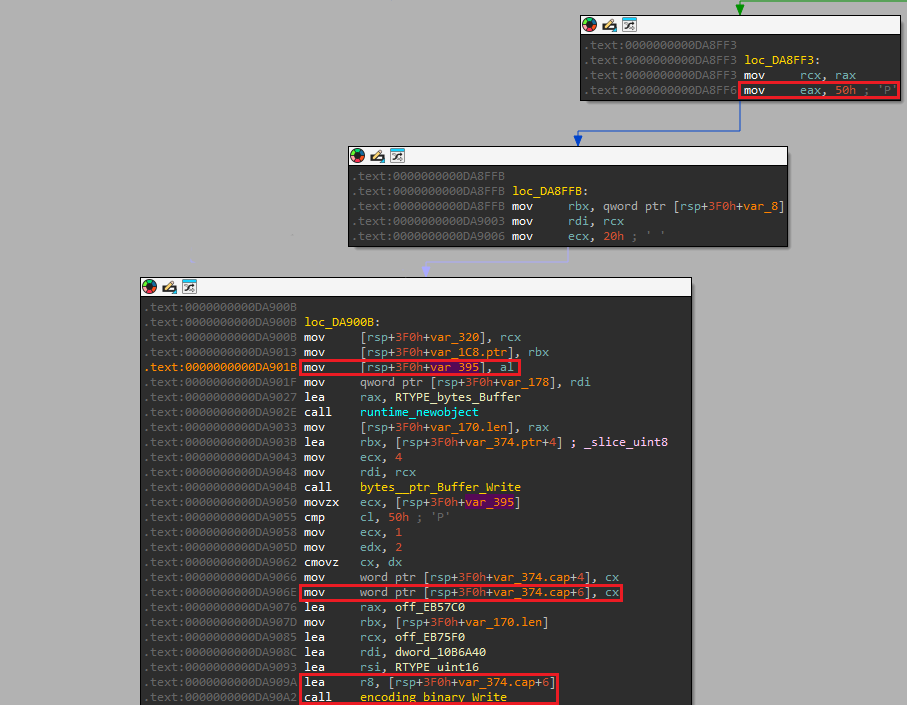
Now, when this routine ends successfully, we see at 0xDA8FF6 the value of 0x50
is moved back into eax.
At 0xDA901B the value gets moved to [rsp+3F0h+var_395], which later on gets
moved into ecx and is subsequently moved into [rsp+3F0h+var_374.cap+6] which
is passed to the Write function and written to the end of the file.
Therefore, we can conclude that the value 0x50 or P is the single character it
writes to the file footer to
indicate partial encryption for large files.
Setting new wallpaper
Q23) The malware uses a specific Windows API function from user32.dll to apply the new wallpaper. What is the name of this function?
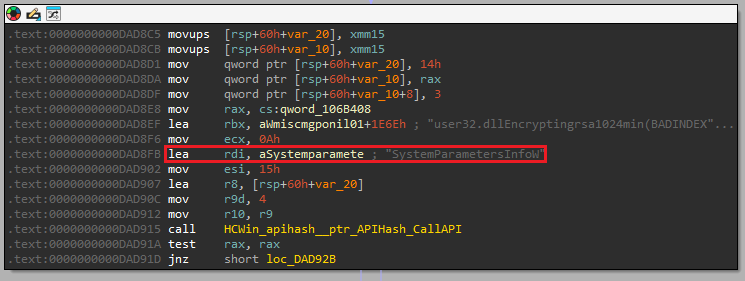
Within the main package, we identify a function called changeWallpaper. By
analyzing this function, we identify the loading of the static string user32.dll, after
which the static string SystemParametersInfoW is loaded. By reading the docs,
we can conclude that this function can be used to change the wallpaper.
SPI Constant
Q24) The malware uses above mentioned API to change the desktop wallpaper. What specific SPI constant (by name) is passed as the 'uiAction' argument to trigger this behavior?
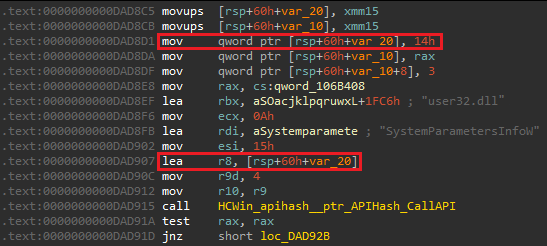
By further analyzing the actions around the API call, we identify that the value 0x14 is
stored in [rsp+60h+var_20] which is later loaded into r8 and passed to the
SystemParametersInfoW call.
This value denotes the SPI constant and using the Windows
docs, we learn that this value corresponds to the SPI string: SPI_SETDESKWALLPAPER
VBScript Execution
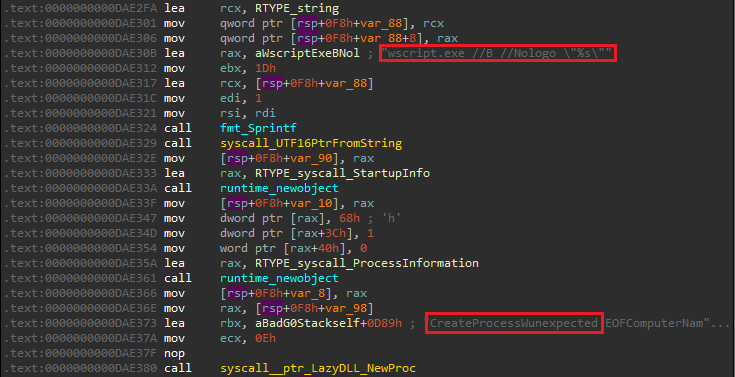
Q25) In the fallback self-destruct mechanism, the malware drops a VBScript to disk. Which Windows executable is explicitly invoked to run this script silently?
The main package contains a function called selfDestruct. The main mechanism
for self-destruction is initiated through the deleteSelfViaReopenFlag. If the result of
this function is negative, we resort to the method which is defined in deleteSelfOnReboot.
Ultimately, if this also fails, we fallback to deleteSelfViaWMI.
Within this function, we identify the vbscript name at 0xDAE287 and subsequently see the
hardcoded Windows executable wscript.exe being passed to CreateProcessW to
execute the script silently (the /b parameter specifies batch mode, which doesn't display
alerts, scripting errors or input prompts.).