Introduction
Mamona is a ransomware strain used by the GLOBAL GROUP ransomware actor. Threat actor analysts
have established that this group is a continuation of previous
ransomware groups Mamona RIP and Black Lock. This analysis dives deeper into one of the two
newly (July 2025) shared samples.
One of the main interesting points is that this ransomware strain has no command-and-control
section and as such it is more difficult to detect using network-based signatures.
Encryption is configurable meaning the operator can target the local or one or more remote
systems and specific files and folders using a set number of
commandline arguments.
Mamona has the following features and behaviours:
- Detect debugging through a call to the Win32 API
DebugBreak - Obfuscates imported functions from specific DLLs through PEB Walk and import hashing
- Prevents execution on already ransomed systems using the mutex:
Global\\Fxo16jmdgujs437 - Attempts to clear the recycle bin using the Win32 API
SHEmtpyRecycleBinA - Attempts to escalate privileges and obtain privileges from the
winlogon.exeorTrustedInstaller.exeprocess - Attempts to clear the event logs
- Disables a specific subset of processes and services
- Contains a specific section called
.configwhich contains the with XOR-encoded README - Encrypts only files based on a specific subset of extensions
- Remove itself from the target system using the command
cmd.exe /C
                    ping 127.0.0.7 -n 3 > Nul & Del /f /q "%s"
| Hash (SHA256) |
|---|
| c5f49c0f566a114b529138f8bd222865c9fa9fa95f96ec1ded50700764a1d4e7 |
In the analysis below, we dive into and attempt to provide an encompassing overview of the specific
features present in this sample.
For feedback, questions and comments feel free to contact me
directly.
DebugBreak to Break Debugging
We will start the analysis of the Mamona ransomware sample starts in the main function. At the
end of the first block, a condition is checked and a jump is taken, either directly to
the end of the main function (exiting our ransomware) or continuing along the long vertical line
of succeeding blocks. This all depends on the result of the call to sub_4012F0. The focus
of sub_4012F0 is on a call to DebugBreak and corresponding exception handling.
In case the DebugBreak call fails, eax returns 0 and execution of the ransomware resumes.
This is the default behaviour when the executable is not attached to any sort of debugger. Should an
exception occur, for example when the executable is attached to a debugger, the call to
DebugBreak is likely to trigger an exception. The custom exception handler implemented by
the ransomware will then check if the exception pointer is equal to the value of
0x80000003, which corresponds to EXCEPTION_BREAKPOINT. If they are equal,
eax will return 1, and the ransomware will stop its execution, as such hindering any
dynamic debugging/reverse engineering attempts.
Command Line Arguments
If DebugBreak does not detect a debugger, the ransomware will continue and starts parsing
the supplied commandline argument. It actually performs this operation twice. The first time, at
0x4028B4, where it will only iterate over all supplied arguments to determine if the
-log argument is supplied. This argument denotes that verbose logging should be enabled and
will execute all blocks that contain a call to WriteConsoleW. Only later on, at
0x402BB0 will it start processing all supplied argument and store its
values for later use.
Below is a comprehensive overview of all supported arguments.
| Argument | Description |
|---|---|
| -path | Defines the specific paths to files/directories that should be encrypted |
| -threads | Defines the number of threads to use during encryption, default is the number of processors returned from SystemInfo.dwNumberOfProcessors |
| -delay | Defines the specific amount of time to wait before starting the encryption process (max 86400 sec/24h) |
| -time | Defines the time when to start the encryption process in HH:MM format |
| -u | Defines the username to use for authentication |
| -p | Defines the password to use for authentication |
| -H | Defines the specific host to target |
| -sub | Defines the specific subnets to scan |
| -code | Defines the password needed to execute the ransomware |
| -skip-local | Defines that local drive encryption should be skipped |
| -skip-net | Defines that network encryption should be skipped |
| -keep | Defines that the ransomware executable should not be deleted |
| -log | Defines that extensive logging should be enabled |
Decrypting the config file
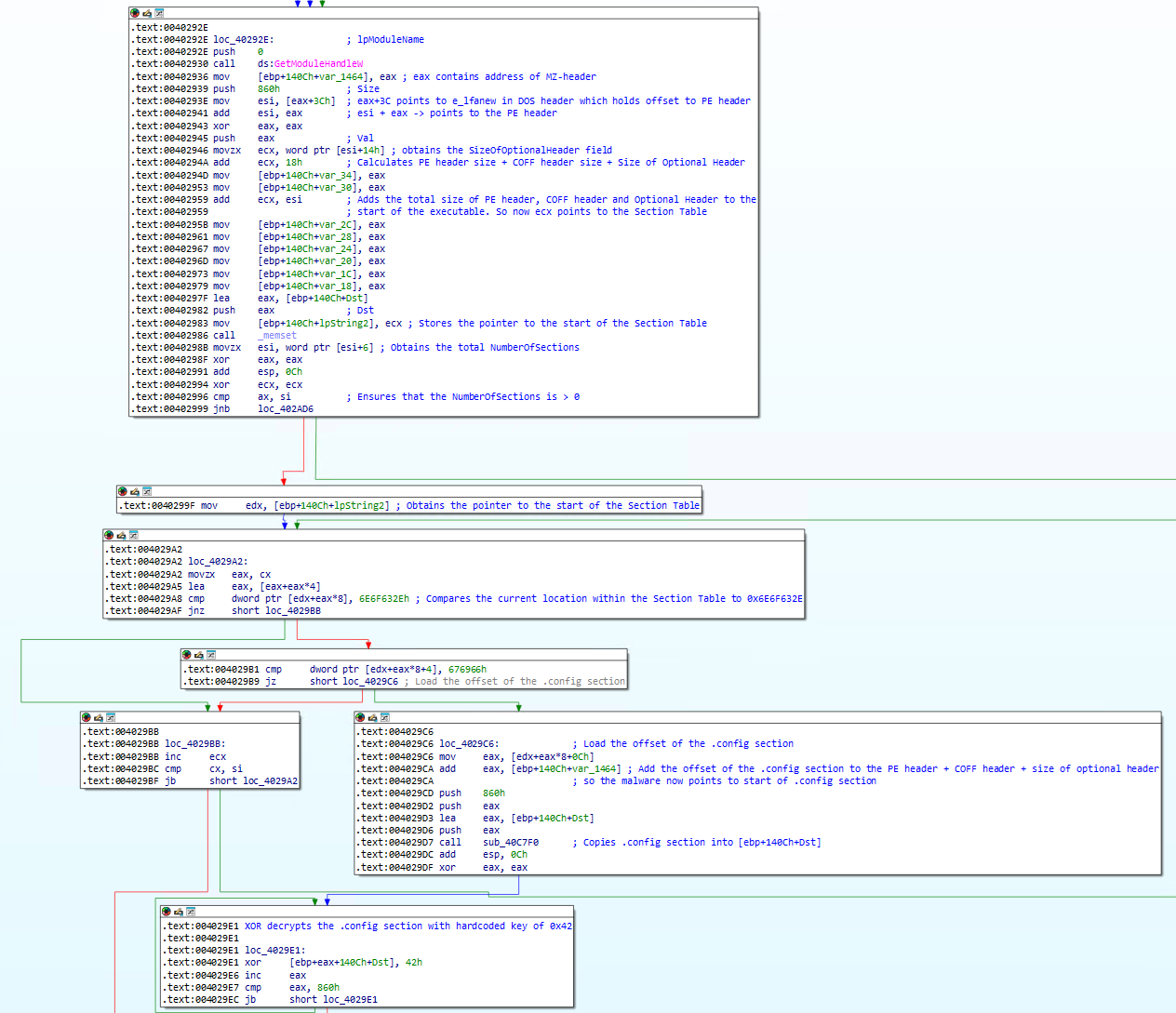
After it identified the absence/presence of the -log argument, the ransomware will call
GetModuleHandleW on the current executable. This returns the base address of the current
module, or in other words it will point to the beginning of this executable. Subsequently, the
ransomware then queries eax+3Ch(0x40293E), which points to the
e_lfanew field in the DOS header. By doing so, it has now obtained the offset to the PE
header. With this offset in hand, the ransomware then 'jumps' to the start of the PE header by adding
the base address of the executable to the PE header offset. The pointer to the PE header is then
stored in esi(0x402941).
The ransomware then queries the value at [esi+14h](0x402946). At this
location within the PE header when including the PE magic bytes, the size of the Optional Header is
stored.
Next, ecx is incremented by 0x18 or 24 (0x40294A). This means that the
ransomware adds the PE signature size, the size of the COFF file header and the size Optional header
together. Then, by adding esi, which points to the start of the PE header, to the total
header size, ecx now points to the start of the section table (0x402959).
Next, the total NumberOfSections is retrieved (0x40298B) and a check takes place to
determine if the NumberOfSections is 0 or not. If the Section Table contains one or more sections, the
ransomware will loop over all of the sections and will compare the section name against a hardcoded
value: .config, as can be noticed by the blocks at 0x4029A2 and
0x4029B1. If the .config section exists the ransomware will read
0x860 bytes into a predefined buffer and will decode the buffer with the hardcoded XOR
key 0x42.
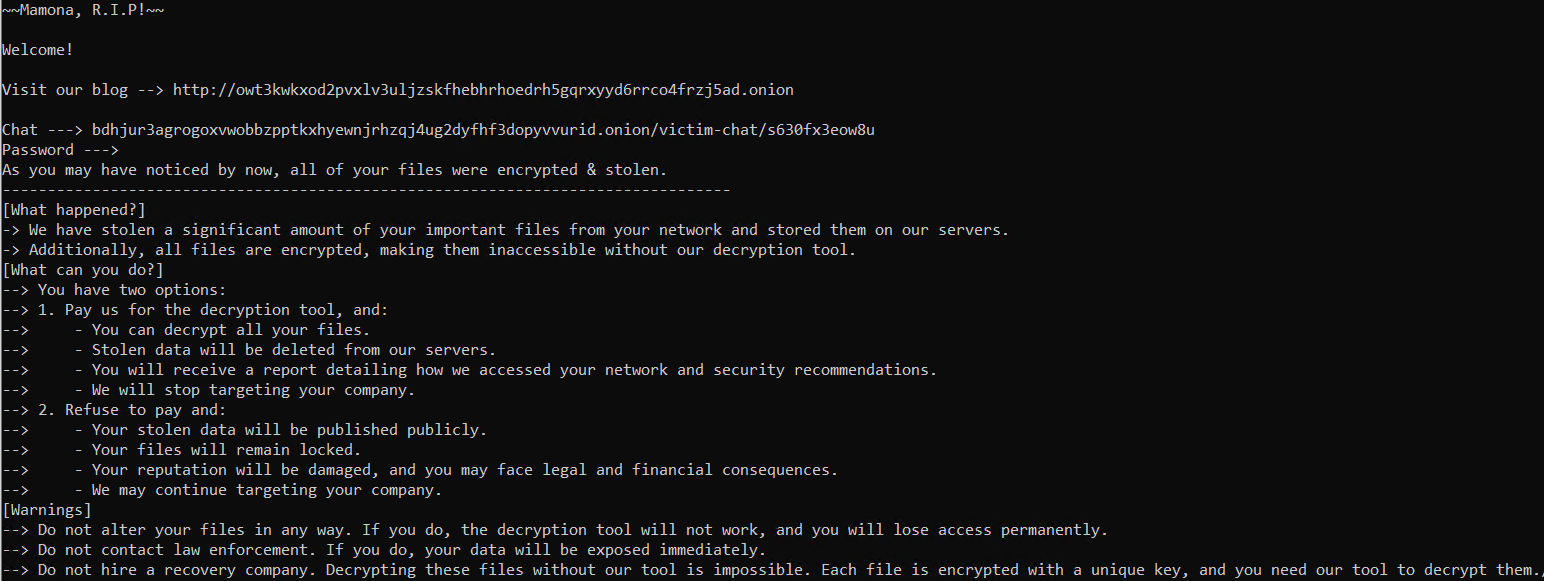
By writing a simple section parser in C++, we can statically extract and decode the
.config section from the sections table and obtain the exact
contents of this section. As we discover, this specific section contains the information
ransomware victims will normally find in a README file
that states how to contact the ransomware operators and restore access to their lost data.
PEB Walk - Part 1
After the .config section has been decrypted, execution is returned to the main function
and quickly afterwards, sub_401370 is called. In sub_401370, we identify
three immediate calls to sub_405900, all with one specific argument: a hardcoded hex
value. To determine the importance of these hex values, let us first analyze sub_405900.
This ransomware sample forced me to properly revisit the documentation and understand how the FS
register works, in part, I have to thank rvsec0n for the well documented blog
post.
The PEB cannot be directly referenced, so in general, the TEB is obtained through the FS register, and
then the obtained offset is incremented by 0x30 to obtain the PEB. We see the combination
of these operations occurring at 0x405914 and 0x40591D.
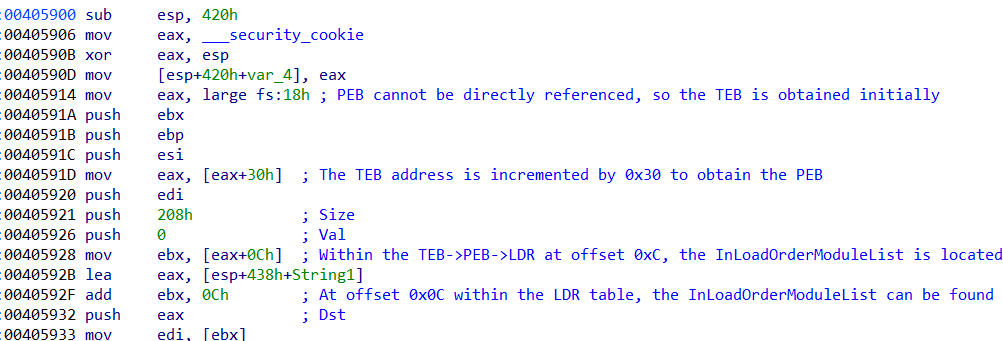
One of the components of the Process Environment Block is the LDR table. This table is obtained
by the ransomware by adding 0x0C to the obtained offset of the PEB. This operation occurs
at 0x405928. The LDR table contains pointers to multiple lists containing the loaded
modules, such as the InMemoryOrderModuleList, InInitializationOrderModuleList as well as the
InLoadOrderModuleList. This last list is a doubly linked list which contains a list of DLLs to process
and is located at offset 0x0C which is obtained by the ransomware at location
0x40592F.
Now that the InLoadOrderModuleList has been obtained, ebx points to the Flink of the first module. A
check is performed to determine if the end of the linked list has been reached. If this is not the
case, the loop will be entered. Else, the loop will be skipped.
The main loop (running from 0x405952 to 0x4059F5) loops over the full
InLoadOrderModuleList and retrieves the full DLL path string. The retrieval of the full DLL path
string can be identified at location 0x405952. In a sub-loop, the full DLL path string is
converted to lowercase. Then, in another sub-loop, the filename + extension are retrieved. Lastly, and
most importantly, the filename + extension are hashed and the resulting output is compared against the
input argument of this function.
This explains the hardcoded hex values that were supplied to this function, as these then must
correspond to three unique DLLs.
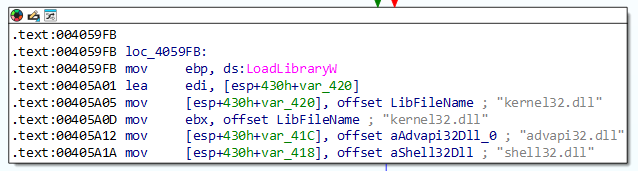
Upon further analysis of sub_405900, it can be identified that if none of the DLLs in the
InLoadOrderModuleList correspond to the input hash value, the ransomware will try to load
kernel32.dll, advapi32.dll and shell32.dll. Based on the fact
that sub_405900 is called three times, and if the input arguments do not correspond to
any DLL in the InLoadOrderModuleList, three specific DLLs will be imported, it can be hypothesized
that these three DLLs correspond to the hash values. This can be proven by the hash generation block
at 0x405A78 which is identical to the block at 0x405D90 where the output
value is subsequently compared against the input buffer at 0x405A88.
To close out, the final block at 0x405AB3 needs to be addressed. Here, the return value
will contain the address pointing to the DllBase. In other words, the return value points to the start
of the DLL. This will only be returned, when the DLL is already in the InLoadOrderModuleList. If this
is not the case, the DLL is loaded through the call to LoadLibrary.
PEB Walk - Part 2
Now that sub_405900 is dissected, let's focus back on sub_401370. The
return value of sub_405900 is either a pointer to the specific DLL, or it is null. It
is checked if each call returned a pointer to the specific DLL before continuining. If one of the
functions did not return a pointer, the function sub_401370 is exited. If all functions
properly returned, the block at 0x4013B2 is entered. Immediately, we can recognize a
distinct pattern: a hard coded hex value and the pointer to either kernel32.dll,
advapi32.dll or shell32.dll is supplied as input arguments for a call to
sub_405AE0. After each call, the return value in eax is then stored in a
global variable.
By diving into sub_405AE0, initial checks can be identified which ensure that the
supplied pointer to the DLL actually is a DLL. These checks include identifying the existance of the
MZ and PE headers. Subsequently, the function will loop over all imported
functions, hash each function name and compare the hash against the supplied hardcoded hex value. In
total, 18 functions from kernel32.dll, 3 functions from advapi32.dll and 1
function from shell32.dll are imported this way.
The result is each time stored in a unique global variable for later reference/use. By using cross
referencing in IDA, we identify that not all of the imported functions will be used. Therefore, a
best effort attempt at identifying the specific functions that are used later is made. We use the
C++ code below, to mimic the hashing function and by adding functions often utilized by ransomware
from all three DLLs, we can identify corresponding matches. In some cases, we can also utilize the
function signature (type and count of arguments) passed to the global variable to identify potential
matches.
#include <iostream>

int main() {
    const wchar_t* strings[] = {
        L"kernel32.dll",
        L"advapi32.dll",
        L"shell32.dll",
        nullptr
    };

    for (const wchar_t** p = strings; *p != nullptr; ++p) {
        const wchar_t* str = *p;
        unsigned int init = 0x42;
        const wchar_t* ptr = str;

        if (*ptr != L'\0') {
            do {
                wchar_t c = *ptr++;
                unsigned int old_hash = init;
                init = (init << 5) + c + old_hash;
            } while (*ptr != L'\0');
        }
        std::wcout << L"Hash value: 0x" << std::hex << init << " -- " << str << std::endl;
    }
    return 0;
}| Imported DLL | Corresponding hash |
|---|---|
| kernel32.dll | 0x8E1E9d32 |
| advapi32.dll | 0x84FE3906 |
| shell32.dll | 0xC0B94CC9 |
| Imported functions | Corresponding hash |
|---|---|
| CreateMutexW | 0x8D7EE0E0 |
| CreateFileW | 0x9EEB112D |
| WriteFile | 0x7ED9CC8D |
| CloseHandle | 0xEBC51524 |
| GetFileSize | 0x8D7EE0E0 |
| ReadFile | 0xFD63715E |
| SetFilePointerEx | 0x2BDAFF0C |
| GetFileAttributesW | 0x6437560 |
| SetFileAttributesW | 0x2F4D0EEC |
| MoveFilesExW | 0x6CBFCCED |
| GetModuleFileNameW | 0x4D5FA9E0 |
| GetLogicalDrives | 0x4F1D3C4A |
| GetDriveTypeW | 0x4E4EFCF5 |
| ** | 0xB0286BF8 |
| CreateIoCompletionPort | 0xD11E718D |
| CreateThread | 0x9CE6A30E |
| WaitForSingleObject | 0x5B55B9D7 |
| PostQueuedCompletionStatus | 0x285141AF |
| CryptAcquireContextW | 0xDF72101A |
| CryptGenRandom | 0xA14E93CF |
| CryptReleaseContext | 0x7F5B4B1A |
| SHEmtpyRecycleBinA | 0xBBC7846D |
** I have not been able to find out the corresponding function for
0xB0286BF8
sub_403E50 is used to (re-)import
CryptGenRandom from advapi32.dll.
Mutex creation and taking the trash out
If the PEB walk has succeeded, the ransomware will continue by creating a unique mutex with the
name: Global\\Fxo16jmdgujs437.
Directly after calling CreateMutexW, the ransomware calls GetLastError.
It then performs a check to see if the last error is equal to 0xB7 which corresponds to
ERROR_ALREADY_EXISTS. As such, it can be concluded that the ransomware will only resume
operations if this specific error has not been received. Notice, CreateMutexW returns
an open handle, the ransomware will only close this specific handle after cleanup (discussed later)
at 0x403C1D.
Upon resumption, the ransomware will then go on to call the, by PEB-walk imported, function
SHEmtpyRecycleBinA with the arguments 0, 0, 7. The second argument denotes
that all Recycle Bins on all drives should be emptied. The third argument denotes that no dialog
boxes should be displayed nor should any sound be played.
Clearing event logs
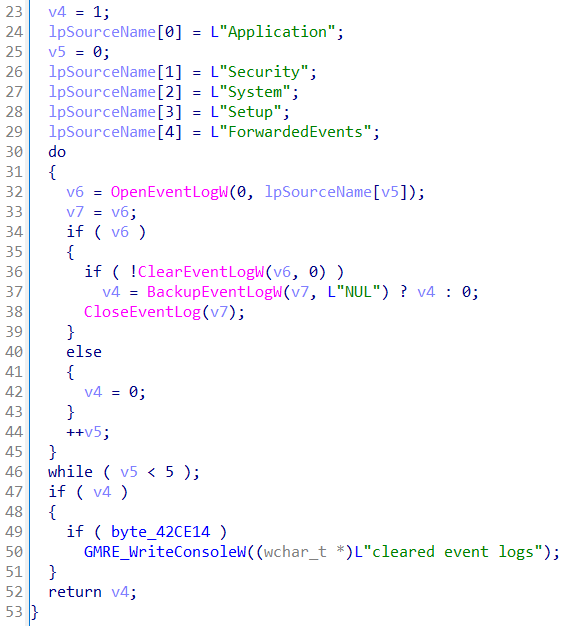
Within the main function, a call to sub_405BC0 takes place. This functions appears to
clear the event logs. First, a handle to ntdll.dll is obtained, after which the
addresses for the functions NtOpenKey and NtClose are queried. If this
operation is successfull, a loop is entered, where the ransomware loops over each of the event logs:
Application, Security, System, Setup and
ForwardedEvents. For each event log, the ransomware tries to clear the logs by calling
ClearEventLogW. Should this fail, the ransomware calls BackupEventLog. It
seems that this operation was potentially aimed at overwriting the event log, but this would not
succeed as the output file name is the literal string NUL.
Escalating Privileges
After clearing the event logs, the ransomware calls sub_406170 from main which contains
further interesting operations. It starts with a call to sub_405EC0.
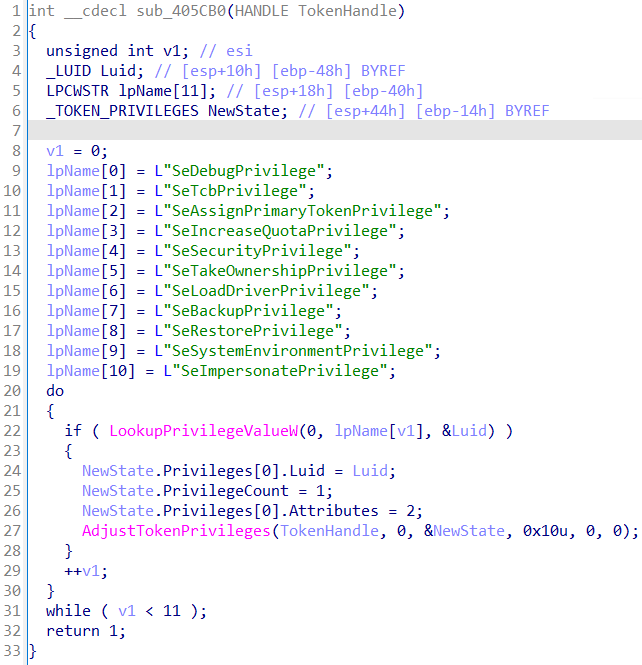
Function sub_405EC0 obtains the current token information from the current process.
The handle to the process token will be passed to sub_405CB0, which is used to try to
adjust the current privileges, if required. For each of 11 hardcoded privileges, the ransomware will
check if it currently has obtained said privilege and if it hasn't, it will try to delegate the
privilege to itself using AdjustTokenPrivilege
Then, in sub_405EC0, the hardcoded string winlogon.exe is passed to the
function sub_405D90. This function loops over all processes using
Process32FirstW and Process32NextW and if the corresponding process
supplied as the input argument is found, it will then return the process ID. Using the process ID,
the malware will first try to open the process using
PROCESS_QUERY_INFORMATION | PROCESS_VM_READ.
If this fails it will try with access right PROCESS_QUERY_LIMITED_INFORMATION. Should
this fail too, the function will return. In any other case, it will obtain the process tokens using
the desired access mask of TOKEN_ALL_ACCESS. If this should fail, it will retry it with
the access mask of TOKEN_QUERY. Next, using sub_405E40, the ransomware
will attempt to duplicate the token obtained from winlogon.exe, and delegate the same
11 privileges as mentioned before to said token. It will then call
ImpersonateLoggedOnUser with the duplicated, high-privilege token.
If all operations so far have succeeded, the ransomware will attempt to open the Service Control
Manager with SC_MANAGER_ALL_ACCESS. If this succeeds, a handle to the service
TrustedInstaller will be obtained. Then, it will be checked if the service status can
be retrieved, or if the service can be started and the start operation did not result in the error
SERVICE_ALREADY_RUNNING. Should these checks pass, the ransomware will try the exact
same privilege escalation process as with the winlogon.exe process.
Killing Services
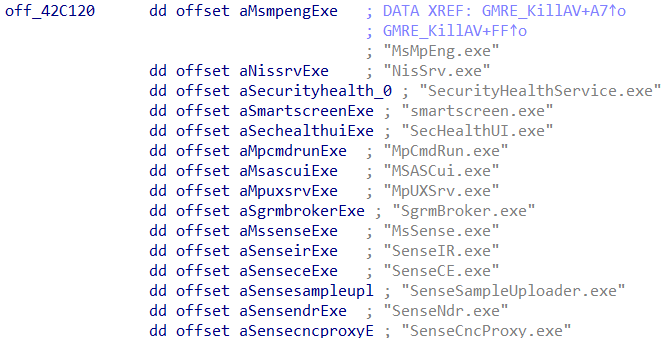
With the elevated privileges, the ransomware now returns back to sub_406170, where it
will attempt to open the Service Control Manager with SC_MANAGER_ALL_ACCESS. If this
succeeds it will iterate over a hardcoded list of services and attempt to terminate the service
(using ControlService) and subsequently attempt to delete the service with a call to
DeleteService.
Killing Processes
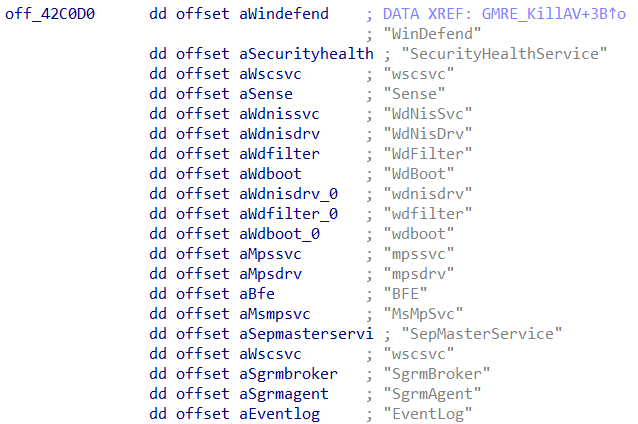
Once all services have been iterated over, the ransomware continues by obtaining a handle to
ntdll.dll to retrieve the process addresses of NtOpenProcess as well as
NtTerminateProcess. Then, it will start iterating over a set of hardcoded processes
and for each process it will attempt to terminate the process. After completing the iterator, the
function ends by calling the Win32 API RevertToSelf to undo the previous escalation of
privileges and returns to main.
Encryption Worker Setup
Before the encryption process is actually started, the selected encryption mode will be
determined. If either network-only or local-only has been selected, either a local thread pool
or remote thread pool will be created respectively. If both modes have been selected, both a local
and remote thread pool will be created. One of the required input values for the creation of a
thread pool is the maximum number of workers that should be spun up consectively. This number, even
if only a remote thread pool is used, is determined by the number of processors available on the
current system, which is retrieved from a call to GetNativeSystemInfo.
Thread pool creation itself takes place in sub_404CA0. First, an I/O completion port is
created using the number of processors as the number of concurrent threads. Furthermore, it will
create a new thread pointing the start address of the thread to sub_405000. The process
within the new thread will call NtRemoveIoCompletion in a
do {...} while () loop. Specifically, the last parameter supplied to this function
dictates that the queue will wait forever until there's more work to process. Within the loop, each
completion packet starts up a worker which then retrieves the per-job object via the key, runs the
object's next step and likely marks it as finished when completed. For now, the loop is empty,
meaning this thread will be in waiting mode until jobs are added.
Note: New jobs can be added to the queue by using the high level API
PostQueuedCompletionStatus or lower level NtSetIoCompletion.
Encrypting the Local System
The ransomware will determine what drives and paths to encrypt based on the supplied commandline
arguments. If no paths have been supplied, the ransomware will encrypt all drives. To do so, it will
use GetLogicalDrives and loop over the results with GetDriveTypeW to
determine the valid drives.
Once it has obtained all valid drives or supplied paths in the arguments, it will check if a
delay has been specified and will delay execution using NtDelayExecution for the
specified amount of seconds.
For both drives and supplied paths, it will loop over them, and determine, by calling
GetFileAttributesW, if the object is a file or directory. If it is a file,
a direct call to sub_401B50 will take place. This appears to be an overarching function
which is responsible for reading the input file and performing the encryption before writing the
encrypted blob back to the file. Without diving into the specific encryption process, there seems to
be a hardcoded key being used: xcrydtednotstill_amazingg_time!!. If the custom path
points to a folder, the function sub_401770 is called.
Function sub_401770 will loop over all files in the directory, and for each file it
finds that has one of the extensions listed below, it will add a job to the I/O completion port for
encryption.
| Valid file extensions | |
|---|---|
| .exe | .dll |
| .msi | .sys |
| .ini | .lnk |
Encrypting the Network
If the ransomware operator chooses to encrypt the network, the ransomware will first try to
obtain local network information using the function sub_404360.
Here, the local IP address of the system as well as the domain information will be retrieved
primarily using GetAdaptersAddresses and GetComputerNameW.
Finally, it will obtain the handles of the following functions from the secur32.dll in
the subfunction sub_4064E0:
| Targeted DLLs |
|---|
| LsaConnectUntrusted |
| LsaLookupAuthenticationPackage |
| LsaCallAuthenticationPackage |
| LsaDeregisterLogonProcess |
| LsaFreeReturnBuffer |
Once sub_404360 returns to main, execution will resume and function
sub_404500 is called. This function appears to be responsible for scanning the network,
identifying shares and starting the encryption process of any network-related files. However, before
it starts doing these operations, first a list of all the local drives is obtained and for each
drive that is found, the function sub_402680 is called. This function obtains the file
attribues and if the passed object is a file, it will start encryption, or in any other case it will
call sub_401770, whose functionality was discussed previously under "Encrypting the
local system".
Next, back in sub_404500, a network scan will take place to identify all network
shares. The setup of the prerequisites for scanning the subnet takes place in
sub_404940. Within this function, the already familiar NtSetIoCompletion
can be once again identified. As seen before, NtSetIoCompletion receives a virtual
function table, with a predefined set of functions. We identify that the function
sub_404C00 jumps to sub_403FE0.
Several interesting operations can be identified within this function. For example, it performs IPv4
ICMP echo requests by using IcmpCreateFile and IcmpSendEcho. Furthermore,
it attempts network hash authentication through sub_406570, using Kerberos and a
combination of LsaConnectUntrusted, LsaLookupAuthenticationPackage and
WNetAddConnection2W. Lastly, it performs network share enumeration by calling
NetShareEnum. Ultimately, it returns with a list of enumerated network shares to be
encrypted.
The encryption routine is called by sub_404500 and as expected it uses the I/O
completion port again, with another predefined set of functions residing in another unique virtual
function table. Within this vftable, the function sub_404C10 is responsible for calling
the previously discussed function sub_402680 which calls the main encryption function.
After sending the encryption tasks to the I/O completion port, sub_404500 returns
execution back to main.
Thank You and Well Done
Regardless of the encryption mode that was selected, the created I/O completion port needs to be
told all tasks have been completed and the port can be shut down.
This specific operation takes place in sub_404D80, where the
function PostQueuedCompletionStatus is called.
The PostQueuedCompletionStatus is particularly responsible for posting an I/O completion packet,
telling the port it can and will be shutdown. After this operation
has succeeded, any open handles are closed before returning to main.
Creating the Wallpaper
Once the encryption process has been completed, a call to sub_405370 can be identified.
This function looks interesting as it relies on the PEB walk to import further functions before
performing several operations. Using our previously mentioned tool, we can identify the used DLLs
and functions and identify that two new DLLs are used and a total of 16 functions are imported:
| Imported DLL | Corresponding hash |
|---|---|
| user32.dll | 0x86A4AF70 |
| gdi32.dll | 0x86A4AF70 |
| Imported functions | Corresponding hash |
|---|---|
| GetDC | 0x9F329E09 |
| ReleaseDC | 0xFCD551AA |
| SystemParametersInfoW | 0xE328CF3E |
| FillRect | 0x38766F37 |
| DrawTextW | 0x77A89D4C |
| CreateCompatibleDC | 0xDA03C35D |
| CreateCompatibleBitmap | 0xF106F453 |
| GetDeviceCaps | 0x770B6E19 |
| DeleteDC | 0x2B9DC79C |
| SelectObject | 0x9AD2AC39 |
| DeleteObject | 0xEA45C72C |
| SetBkMode | 0x881F6820 |
| SetTextColor | 0x5F7115D2 |
| CreateFontW | 0x9EEE65E4 |
| GetDIBits | 0x14870CA1 |
| CreateSolidBrush | 0x110B295 |
Once the function import process has been completed, a file with the name wallpaper.bmp
is created. Once the file is successfully created, the function SystemParametersInfoW
is
used to set the actual wallpaper. The first parameter passed to it is the uiAction,
where
the value 0x14 corresponds with SPI_SETDESKWALLPAPER. The second parameter
passed to it is the uiParam, with a value of 0x0 since no uiParam is
expected when using SPI_SETDESKWALLPAPER. The third parameter holds the path to the
wallpaper file. The fourth, and last, parameter is the fWinIni value 0x3
which corresponds to SPIF_SENDWININICHANGE, meaning the WM_SETTINGCHANGE
message will be broadcasted after updating the user profile.
Cleanup
If the commandline argument -keep was not supplied, the ransomware will delete
itself by executing the command: cmd.exe /C ping 127.0.0.7 -n 3 > Nul & Del /f /q "%s",
where it will place the the result from GetModuleFileNameW into the format string,
effectively pointing to itself. The ping is used as a delaying mechanism which should provide the
ransomware enough time to exit before the executable is removed. Furthermore, the ransomware also
marks itself for deletion by calling SetFileInformationByHandle. This can be gleaned
from the second and third argument. The value 0x4 for the FileInformationClass
corresponds to FILE_DISPOSITION_INFO. This struct contains exactly one value:
DeleteFile, which is set to the value of 1 on line 0x405319.
Closing Off
After the cleanup function, the ransomware exits and should have successfully achieved its
objectives.
Thank you for reading this extensive analysis of the Mamona ransomware variant. For feedback,
questions and comments feel free to contact me directly.